Today, we will learn how to install Debian on Parallels.


If you follow the screenshots carefully you can have a VM with 8GB Ram and 64GB trim SSD.
Today, we will learn how to install Debian on Parallels.
If you follow the screenshots carefully you can have a VM with 8GB Ram and 64GB trim SSD.
On this article Coder by Gleentech will teach you how to terminal commands from BSD systems.
Today we saw a growth in Unix and Linux as smartphone, embedded systems. Sometimes we encounter FreeDOS. But nowadays the ecosystem we see is Unix and Linux. Those two systems can be found on iOS and Android systems, besides ChromeOS. In this article, I will teach the basics, the basic
commands to manipulate easily your system.
I will teach how to use list directories, change directories, count words, use grep for debugging, and pipelines. This is an article for introduction is not a hard way article to achieve everything. I want to deliver an easy way to get deep into it. Learning Unix is not an easy task, it takes time. You cannot learn everything in one day about Unix. You need to learn and read tons of papers to have knowledge.
For start, we will go to call the terminal. It’s a command prompt. You must call konsole or terminal application. I am going to have all the examples with konsole.
The first command we see is ls.

As we see we can list a directory.

We see with this command the working directory

Why did I choose 4 languages to code for 2022?
This new article from coder by Gleentech is about an opinion I am giving to all my readers on our official website. I wanted to write about which languages I chose but I see a lot writing about this but I am writing too. I decided to write because I wanted to show which programming languages I chose to code. I have been coding these languages over the last 4 years.
I have been coding nativescript as a new over the last few days. I made two applications already.
With nativescript it’s a good tool to code in Javascript with a few frameworks. I am working with nativescript because Cordova ceased their activity over apache. I was a Cordova developer. Now, I switched to telerik nativescript. It’s an open source tool to make iOS and android applications with javascript. I chose to use nativescript with vuejs. I am learning vuejs too. I decided to focus on nativescript, qt and coldfusion.
Today, we don’t need to focus with a lot of languages because you don’t need to know a lot. It’s better to know a few and focus on them.
This article is ready for 2022 new year’s day. It’’s focus on my knowledge to speak freely, to show which are the main goals for 2022.
I am very focused on to show my needs turned to yours. Try to focus on these four programming languages.
This will be my last article on coder by Gleentech before New Year’s eve and Christmas.
I chose 4 programming languages which are Java, C/C++, Javascript, typescript.
Java:
This language is highly used on big companies. It’s a good language to learn. First try to understand what is a VM(Virtual Machine) and their properties before into deep. Java was a coded language from Sun now it’s an Oracle product. Today, this language is highly used for enterprises, big applications. With Java I chose coldfusion to code because its a powerful tool to design websites for companies.
C/C++:
I chose C/C++ to code for the operating systems application and tools. I learnt C and C++ in high school and before that. I use makefile to compile the code. Today, I am learning to use C++ with cmake also under qt5 and qt6. Nowadays, the qt is a high powerful tool to code GUI and powerful GUI applications. For C and C++ I use vs code and Netbeans also qt creator for coding qt widgets.
Learning this programming is a valuable asset. Almost everything coded for operating systems even kernel is coded with C and C++. I like very much this language because it was one of the first languages I learnt beside visual basic 6. Nowadays, we can do high profiling applications with so many tools out there like vagrant.
Javascript:
This is a programming language type script, which is embedded to web browsers. Today, knowing this programming language is a valuable knowledge too. We must know javascript to make websites and native applications for iOS and android. With this programming language you can code html, css and javascript with frameworks and turn the website into a native application.
You can learn how to use parcel or babel to make front-end Nodejs websites besides backend.
Today, you can use Javascript for front-end and backend with v8 engine. There are so many tools out there to help you out. It’s highly recommended to learn Nodejs. With Nodejs you can code a lot of things. The npm is a tool to install plugins for Nodejs. It’s highly customizable.
I chose Javascript to code all my web content and management.
Typescript:
It’s a superset from Microsoft open source for javascript came 2012. It’s a highly typed language. It’s mostly a highly powerful typed language. This is a powerful toolkit. It’s a powerful programming language. It’s a true highly typed language.
Because of these languages, I chose nativescript, qt, coldfusion to code. With these tools, I can code for iOS, android, web and desktop applications.
With nativescript I can code iOS and android with html, javascript, css and typescript. Under nativescript we can code with angular, vue and ionic frameworks.
I am very focused on this tool. It’s very powerful. I am a newbie on these roads, but I am learning over a book I bought it in amazon. I can run now two applications that I made. I am building a new one, focused on supabase data management. I am learning lucee too. It’s a java coldfusion enterprise edition. I made a few articles that will come out soon about coldfusion. For web are these two powerful tools to make our needs.
For me, teach and learn C++, I code qt5 and qt6. I am working with qt over the last 5 years on my Mac. I am coding qt too on a Ubuntu VM under virtualbox and vagrant.
-For my opinion never learn too many languages. If you learn you are not good in all.
You may focus on 3 or 4 languages and practice them all, to become good in all. I learnt a lot with my dad coding. He told me to focus only on 3 or 4 languages and keep practicing them. So, my goal and focus are C/C++, Java, Javascript and typescript. I am focus on all these besides had the newbies knowledge of vuejs. I am trying to learn vuejs framework for frontend Nodejs. We can learn express too for backend Nodejs. You must focus on these or choose the right languages you want.
After this, you can also learn php. You can learn php because the majority of the simple web hosting are php with WordPress. You must learn WordPress too well. Mostly the websites are php, WordPress hosting. The majority of the websites I build over the last 10 years were WordPress.
I won’t give up from it, I will code and still code php for WordPress because the people want cheap solutions and web application too. You must as reader try to understand our coder by Gleentech opinion as a constructive assessment. We as a magazine we try to solve solutions to you and back to you.
WordPress:
I choose WordPress with php to code the main core of the majority websites I am dealing with in the last 9 to 10 years. It’s a powerful CMS, well documented. We ca deal with APIs too. We can manage our all website from a backend. This CMS is a must to code, frontend and backend and split of, it’s a monolithic structure. Before you dive into WordPress try to learn about the structure and some php code. It can be your strength power tool to manage all your websites. Follow the steps very careful to code php inside WordPress. For that I will teach as a reader php before dig into WordPress.
You can learn how to manage, code a theme, a plugin. Otherwise code the instalment after you install on a local machine. If you want to code and learn it with a word-press instalment you will need to have an ide, for that I choose VS Code or Netbeans from apache foundation.
Nativescript:
Its a powerful tool to code html, javascript, css, scss into a native application for iOS and android. I am talking about it because I chose it to code instead. The defunct cordova. It’s highly active.
Today, I will keep coding on this platform, for me it’s the future. If you know web, you can code easily on nativescript. First teach yourself vue, ionic or angular. These frameworks are highly used, so you can use them.
Qt:
You must learn qt, for me it’s a powerful tool to code in C/C++. Today with the new qtcreator you can code with cmake instead make or qmake.
We must learn cmake nowadays. It’s a good tool to learn. We every day, we are learning and teaching by us and from others.
This article it’s a must to see. It teaches you how to choose the right programming languages and the right tools to code. I hope to see you on the next article. I hope to see you next time.
Welcome again to coder by gleentech. Today we will introduce how to code coldfusion and heroku hosting.
Coldfusion is an old architecture for server-side since 1995. It works on the server-side. It’s a tag language. Written in JAVA. Since the rewritten in java since 2002, the tags evolved so much. It can be written with html5, css and javascript. There are a few tags for generation forms. On this tutorial I will explain how the heroku interacts with coldfusion (Lucee version)
Go to lucee website and download the file. It can be downloaded as jar or even in war file.
Download the GitHub as it follows for our example.
-> git clone https://github.com/mikesprague/lucee5-heroku
-> cd lucee5-heroku && mvn package
-> foreman start
You will need to register for an account on heroku and create an app for the tutorial as it follows.
Then you will need to clone the deploy from GitHub online on heroku.
Now, open your folder on the Netbeans. Go to webroot, open index.cfm then copy paste:
<cfscript>
refURL=”http://docs.lucee.org”;
wikiURL=”https://bitbucket.org/lucee/lucee/wiki/Home”;
bbURL=”https://bitbucket.org/lucee/lucee”;
adminURL=”#CGI.CONTEXT_PATH#/lucee/admin.cfm”;
webAdminURL=”#CGI.CONTEXT_PATH#/lucee/admin/web.cfm”;
serverAdminURL=”#CGI.CONTEXT_PATH#/lucee/admin/server.cfm”;
mailinglistURL=”https://groups.google.com/forum/##!forum/lucee”;
profURL=”https://www.lucee.org/support.html”;
issueURL=”https://bitbucket.org/lucee/lucee/issues”;
newURL=”http://docs.lucee.org/guides/lucee-5.html”;
</cfscript>
<!DOCTYPE html>
<html>
<head>
<meta charset=”utf-8″>
<meta name=”viewport” content=”width=device-width, initial-scale=1.0, shrink-to-fit=no”>
<title>Home – Pedro Dias Vicente</title>
<link rel=”stylesheet” href=”assets/bootstrap/css/bootstrap.min.css”>
<link rel=”stylesheet” href=”https://fonts.googleapis.com/css?family=Montserrat:400,700″>
<link rel=”stylesheet” href=”https://fonts.googleapis.com/css?family=Lato:400,700,400italic,700italic”>
<link rel=”stylesheet” href=”https://cdnjs.cloudflare.com/ajax/libs/font-awesome/4.7.0/css/font-awesome.min.css”>
</head>
<body id=”page-top” data-bs-spy=”scroll” data-bs-target=”#mainNav” data-bs-offset=”72″>
<nav class=”navbar navbar-light navbar-expand-lg fixed-top bg-secondary text-uppercase” id=”mainNav”>
<div class=”container”><a class=”navbar-brand” href=”#page-top”>Pedro Dias Vicente</a><button data-bs-toggle=”collapse” data-bs-target=”#navbarResponsive” class=”navbar-toggler text-white bg-primary navbar-toggler-right text-uppercase rounded” aria-controls=”navbarResponsive” aria-expanded=”false” aria-label=”Toggle navigation”><i class=”fa fa-bars”></i></button>
<div class=”collapse navbar-collapse” id=”navbarResponsive”>
<ul class=”navbar-nav ms-auto”>
<li class=”nav-item mx-0 mx-lg-1″><a class=”nav-link py-3 px-0 px-lg-3 rounded” href=”#portfolio”>Portfolio</a></li>
<li class=”nav-item mx-0 mx-lg-1″><a class=”nav-link py-3 px-0 px-lg-3 rounded” href=”#about”>About</a></li>
<li class=”nav-item mx-0 mx-lg-1″><a class=”nav-link py-3 px-0 px-lg-3 rounded” href=”#contact”>Contact</a></li>
</ul>
</div>
</div>
</nav>
<header class=”text-center text-white bg-primary masthead”>
<div class=”container”><img class=”img-fluid d-block mx-auto mb-5″ src=”assets/img/profile.png”>
<h1>Pedro Dias Vicente</h1>
<hr class=”star-light”>
<h2 class=”font-weight-light mb-0″>Web Developer – C/C++ – devOPS</h2>
</div>
</header>
<section id=”portfolio” class=”portfolio”>
<div class=”container”>
<h2 class=”text-uppercase text-center text-secondary”>Portfolio</h2>
<hr class=”star-dark mb-5″>
<div class=”row”>
<div class=”col-md-6 col-lg-4″><a class=”d-block mx-auto portfolio-item” href=”#portfolio-modal-1″ data-bs-toggle=”modal”>
<div class=”d-flex portfolio-item-caption position-absolute h-100 w-100″>
<div class=”text-center text-white my-auto portfolio-item-caption-content w-100″><i class=”fa fa-search-plus fa-3x”></i></div>
</div><img class=”img-fluid” src=”assets/img/portfolio/cabin.png”>
</a></div>
<div class=”col-md-6 col-lg-4″><a class=”d-block mx-auto portfolio-item” href=”#portfolio-modal-2″ data-bs-toggle=”modal”>
<div class=”d-flex portfolio-item-caption position-absolute h-100 w-100″>
<div class=”text-center text-white my-auto portfolio-item-caption-content w-100″><i class=”fa fa-search-plus fa-3x”></i></div>
</div><img class=”img-fluid” src=”assets/img/portfolio/cake.png”>
</a></div>
<div class=”col-md-6 col-lg-4″><a class=”d-block mx-auto portfolio-item” href=”#portfolio-modal-3″ data-bs-toggle=”modal”>
<div class=”d-flex portfolio-item-caption position-absolute h-100 w-100″>
<div class=”text-center text-white my-auto portfolio-item-caption-content w-100″><i class=”fa fa-search-plus fa-3x”></i></div>
</div><img class=”img-fluid” src=”assets/img/portfolio/circus.png”>
</a></div>
<div class=”col-md-6 col-lg-4″><a class=”d-block mx-auto portfolio-item” href=”#portfolio-modal-4″ data-bs-toggle=”modal”>
<div class=”d-flex portfolio-item-caption position-absolute h-100 w-100″>
<div class=”text-center text-white my-auto portfolio-item-caption-content w-100″><i class=”fa fa-search-plus fa-3x”></i></div>
</div><img class=”img-fluid” src=”assets/img/portfolio/game.png”>
</a></div>
<div class=”col-md-6 col-lg-4″><a class=”d-block mx-auto portfolio-item” href=”#portfolio-modal-5″ data-bs-toggle=”modal”>
<div class=”d-flex portfolio-item-caption position-absolute h-100 w-100″>
<div class=”text-center text-white my-auto portfolio-item-caption-content w-100″><i class=”fa fa-search-plus fa-3x”></i></div>
</div><img class=”img-fluid” src=”assets/img/portfolio/safe.png”>
</a></div>
<div class=”col-md-6 col-lg-4″><a class=”d-block mx-auto portfolio-item” href=”#portfolio-modal-6″ data-bs-toggle=”modal”>
<div class=”d-flex portfolio-item-caption position-absolute h-100 w-100″>
<div class=”text-center text-white my-auto portfolio-item-caption-content w-100″><i class=”fa fa-search-plus fa-3x”></i></div>
</div><img class=”img-fluid” src=”assets/img/portfolio/submarine.png”>
</a></div>
</div>
</div>
</section>
<section class=”text-white bg-primary mb-0″ id=”about”>
<div class=”container”>
<h2 class=”text-uppercase text-center text-white”>About</h2>
<hr class=”star-light mb-5″>
<div class=”row”>
<div class=”col-lg-4 ms-auto”>
<p class=”lead”>Freelancer is a free bootstrap theme. The download includes the complete source files including HTML, CSS, and JavaScript as well as optional LESS stylesheets for easy customization.</p>
</div>
<div class=”col-lg-4 me-auto”>
<p class=”lead”>Whether you’re a student looking to showcase your work, a professional looking to attract clients, or a graphic artist looking to share your projects, this template is the perfect starting point!</p>
</div>
</div>
<div class=”text-center mt-4″><a class=”btn btn-outline-light btn-xl” role=”button” href=”#”><i class=”fa fa-download me-2″></i><span>Download Now!</span></a></div>
</div>
</section>
<section id=”contact”>
<div class=”container”>
<h2 class=”text-uppercase text-center text-secondary mb-0″>Contact Me</h2>
<hr class=”star-dark mb-5″>
<div class=”row”>
<div class=”col-lg-8 mx-auto”>
<form id=”contactForm” name=”sentMessage” novalidate=”novalidate”>
<div class=”control-group”>
<div class=”mb-0 form-floating controls pb-2″><input class=”form-control” type=”text” id=”name” required=”” placeholder=”Name”><label class=”form-label”>Name</label><small class=”form-text text-danger help-block”></small></div>
</div>
<div class=”control-group”>
<div class=”mb-0 form-floating controls pb-2″><input class=”form-control” type=”email” id=”email” required=”” placeholder=”Email Address”><label class=”form-label”>Email Address</label><small class=”form-text text-danger help-block”></small></div>
</div>
<div class=”control-group”>
<div class=”mb-0 form-floating controls pb-2″><input class=”form-control” type=”tel” id=”phone” required=”” placeholder=”Phone Number”><label class=”form-label”>Phone Number</label><small class=”form-text text-danger help-block”></small></div>
</div>
<div class=”control-group”>
<div class=”mb-5 form-floating controls pb-2″><textarea class=”form-control” id=”message” required=”” placeholder=”Message” style=”height: 150px;”></textarea><label class=”form-label”>Message</label><small class=”form-text text-danger help-block”></small></div>
</div>
<div id=”success”></div>
<div><button class=”btn btn-primary btn-xl” id=”sendMessageButton” type=”submit”>Send</button></div>
</form>
</div>
</div>
</div>
</section>
<footer class=”text-center footer”>
<div class=”container”>
<div class=”row”>
<div class=”col-md-4 mb-5 mb-lg-0″>
<h4 class=”text-uppercase mb-4″>Location</h4>
<p>2215 John Daniel Drive<br>Clark, MO 65243</p>
</div>
<div class=”col-md-4 mb-5 mb-lg-0″>
<h4 class=”text-uppercase”>Around the Web</h4>
<ul class=”list-inline”>
<li class=”list-inline-item”><a class=”btn btn-outline-light text-center btn-social rounded-circle” role=”button” href=”#”><i class=”fa fa-facebook fa-fw”></i></a></li>
<li class=”list-inline-item”><a class=”btn btn-outline-light text-center btn-social rounded-circle” role=”button” href=”#”><i class=”fa fa-google-plus fa-fw”></i></a></li>
<li class=”list-inline-item”><a class=”btn btn-outline-light text-center btn-social rounded-circle” role=”button” href=”#”><i class=”fa fa-twitter fa-fw”></i></a></li>
<li class=”list-inline-item”><a class=”btn btn-outline-light text-center btn-social rounded-circle” role=”button” href=”#”><i class=”fa fa-dribbble fa-fw”></i></a></li>
</ul>
</div>
<div class=”col-md-4″>
<h4 class=”text-uppercase mb-4″>About Freelancer</h4>
<p class=”lead mb-0″><span>Freelance is a free to use, open source Bootstrap theme. </span></p>
</div>
</div>
</div>
</footer>
<div class=”text-center text-white copyright py-4″>
<div class=”container”><small>Copyright © Pedro Dias Vicente 2021</small></div>
</div>
<div class=”d-lg-none scroll-to-top position-fixed rounded”><a class=”text-center d-block rounded text-white” href=”#page-top”><i class=”fa fa-chevron-up”></i></a></div>
<div class=”modal text-center” role=”dialog” tabindex=”-1″ id=”portfolio-modal-1″>
<div class=”modal-dialog modal-lg” role=”document”>
<div class=”modal-content”>
<div class=”modal-header”><button type=”button” class=”btn-close” data-bs-dismiss=”modal” aria-label=”Close”></button></div>
<div class=”modal-body”>
<div class=”container text-center”>
<div class=”row”>
<div class=”col-lg-8 mx-auto”>
<h2 class=”text-uppercase text-secondary mb-0″>Project Name</h2>
<hr class=”star-dark mb-5″><img class=”img-fluid mb-5″ src=”assets/img/portfolio/cabin.png”>
<p class=”mb-5″>Lorem ipsum dolor sit amet, consectetur adipisicing elit. Mollitia neque assumenda ipsam nihil, molestias magnam, recusandae quos quis inventore quisquam velit asperiores, vitae? Reprehenderit soluta, eos quod consequuntur itaque. Nam.</p>
</div>
</div>
</div>
</div>
<div class=”modal-footer pb-5″><a class=”btn btn-primary btn-lg mx-auto rounded-pill portfolio-modal-dismiss” role=”button” data-bs-dismiss=”modal”><i class=”fa fa-close”></i> Close Project</a></div>
</div>
</div>
</div>
<div class=”modal text-center” role=”dialog” tabindex=”-1″ id=”portfolio-modal-2″>
<div class=”modal-dialog modal-lg” role=”document”>
<div class=”modal-content”>
<div class=”modal-header”><button type=”button” class=”btn-close” data-bs-dismiss=”modal” aria-label=”Close”></button></div>
<div class=”modal-body”>
<div class=”container text-center”>
<div class=”row”>
<div class=”col-lg-8 mx-auto”>
<h2 class=”text-uppercase text-secondary mb-0″>Project Name</h2>
<hr class=”star-dark mb-5″><img class=”img-fluid mb-5″ src=”assets/img/portfolio/cake.png”>
<p class=”mb-5″>Lorem ipsum dolor sit amet, consectetur adipisicing elit. Mollitia neque assumenda ipsam nihil, molestias magnam, recusandae quos quis inventore quisquam velit asperiores, vitae? Reprehenderit soluta, eos quod consequuntur itaque. Nam.</p>
</div>
</div>
</div>
</div>
<div class=”modal-footer pb-5″><a class=”btn btn-primary btn-lg mx-auto rounded-pill portfolio-modal-dismiss” role=”button” data-bs-dismiss=”modal”><i class=”fa fa-close”></i> Close Project</a></div>
</div>
</div>
</div>
<div class=”modal text-center” role=”dialog” tabindex=”-1″ id=”portfolio-modal-3″>
<div class=”modal-dialog modal-lg” role=”document”>
<div class=”modal-content”>
<div class=”modal-header”><button type=”button” class=”btn-close” data-bs-dismiss=”modal” aria-label=”Close”></button></div>
<div class=”modal-body”>
<div class=”container text-center”>
<div class=”row”>
<div class=”col-lg-8 mx-auto”>
<h2 class=”text-uppercase text-secondary mb-0″>Project Name</h2>
<hr class=”star-dark mb-5″><img class=”img-fluid mb-5″ src=”assets/img/portfolio/circus.png”>
<p class=”mb-5″>Lorem ipsum dolor sit amet, consectetur adipisicing elit. Mollitia neque assumenda ipsam nihil, molestias magnam, recusandae quos quis inventore quisquam velit asperiores, vitae? Reprehenderit soluta, eos quod consequuntur itaque. Nam.</p>
</div>
</div>
</div>
</div>
<div class=”modal-footer pb-5″><a class=”btn btn-primary btn-lg mx-auto rounded-pill portfolio-modal-dismiss” role=”button” data-bs-dismiss=”modal”><i class=”fa fa-close”></i> Close Project</a></div>
</div>
</div>
</div>
<div class=”modal text-center” role=”dialog” tabindex=”-1″ id=”portfolio-modal-4″>
<div class=”modal-dialog modal-lg” role=”document”>
<div class=”modal-content”>
<div class=”modal-header”><button type=”button” class=”btn-close” data-bs-dismiss=”modal” aria-label=”Close”></button></div>
<div class=”modal-body”>
<div class=”container text-center”>
<div class=”row”>
<div class=”col-lg-8 mx-auto”>
<h2 class=”text-uppercase text-secondary mb-0″>Project Name</h2>
<hr class=”star-dark mb-5″><img class=”img-fluid mb-5″ src=”assets/img/portfolio/game.png”>
<p class=”mb-5″>Lorem ipsum dolor sit amet, consectetur adipisicing elit. Mollitia neque assumenda ipsam nihil, molestias magnam, recusandae quos quis inventore quisquam velit asperiores, vitae? Reprehenderit soluta, eos quod consequuntur itaque. Nam.</p>
</div>
</div>
</div>
</div>
<div class=”modal-footer pb-5″><a class=”btn btn-primary btn-lg mx-auto rounded-pill portfolio-modal-dismiss” role=”button” data-bs-dismiss=”modal”><i class=”fa fa-close”></i> Close Project</a></div>
</div>
</div>
</div>
<div class=”modal text-center” role=”dialog” tabindex=”-1″ id=”portfolio-modal-5″>
<div class=”modal-dialog modal-lg” role=”document”>
<div class=”modal-content”>
<div class=”modal-header”><button type=”button” class=”btn-close” data-bs-dismiss=”modal” aria-label=”Close”></button></div>
<div class=”modal-body”>
<div class=”container text-center”>
<div class=”row”>
<div class=”col-lg-8 mx-auto”>
<h2 class=”text-uppercase text-secondary mb-0″>Project Name</h2>
<hr class=”star-dark mb-5″><img class=”img-fluid mb-5″ src=”assets/img/portfolio/safe.png”>
<p class=”mb-5″>Lorem ipsum dolor sit amet, consectetur adipisicing elit. Mollitia neque assumenda ipsam nihil, molestias magnam, recusandae quos quis inventore quisquam velit asperiores, vitae? Reprehenderit soluta, eos quod consequuntur itaque. Nam.</p>
</div>
</div>
</div>
</div>
<div class=”modal-footer pb-5″><a class=”btn btn-primary btn-lg mx-auto rounded-pill portfolio-modal-dismiss” role=”button” data-bs-dismiss=”modal”><i class=”fa fa-close”></i> Close Project</a></div>
</div>
</div>
</div>
<div class=”modal text-center” role=”dialog” tabindex=”-1″ id=”portfolio-modal-6″>
<div class=”modal-dialog modal-lg” role=”document”>
<div class=”modal-content”>
<div class=”modal-header”><button type=”button” class=”btn-close” data-bs-dismiss=”modal” aria-label=”Close”></button></div>
<div class=”modal-body”>
<div class=”container text-center”>
<div class=”row”>
<div class=”col-lg-8 mx-auto”>
<h2 class=”text-uppercase text-secondary mb-0″>Project Name</h2>
<hr class=”star-dark mb-5″><img class=”img-fluid mb-5″ src=”assets/img/portfolio/submarine.png”>
<p class=”mb-5″>Lorem ipsum dolor sit amet, consectetur adipisicing elit. Mollitia neque assumenda ipsam nihil, molestias magnam, recusandae quos quis inventore quisquam velit asperiores, vitae? Reprehenderit soluta, eos quod consequuntur itaque. Nam.</p>
</div>
</div>
</div>
</div>
<div class=”modal-footer pb-5″><a class=”btn btn-primary btn-lg mx-auto rounded-pill portfolio-modal-dismiss” role=”button” data-bs-dismiss=”modal”><i class=”fa fa-close”></i> Close Project</a></div>
</div>
</div>
</div>
<script src=”https://cdn.jsdelivr.net/npm/bootstrap@5.1.3/dist/js/bootstrap.bundle.min.js”></script>
<script src=”assets/js/script.min.js”></script>
</body>
</html>
Now, you must type on the terminal:
-> mvn package
About the GitHub inside on the heroku is easy to use the cli.
Install heroku cli then:
-> heroku login
-> heroku git:clone -a name_of_the_project
-> cd name_of_the_project
Finally
-> git add .
-> git commit -am “frost commit”
-> git push heroku master
Next article about coldfusion will be about Netbeans and application.cfc structure.
Today is sad news for everyone. Vic3t3chn0 GitHub, my private GitHub will be autumn repo now. I decided to reboot it. So all the core are there will be autumn code. Every time I have past code I will add it there. The GitHub page will be two versions now. The code won’t be on archive mode yet. It will be the public but with a new way to see the code.
The page will be renewed. Stay tuned for more news.
https://github.com/vic3t3chn0
The devlogs of today are back. Back again. Today we will talk about stdafx and windows API. These two options can be useful for windows development besides reactos.
With these two options, we can code and have control over our application for windows 7+ and ReactOS. ReactOS is also types everything with windows API. The win32 API. What is Win32? This core came from windows 95 and beyond. This demystification source can be used with VS SourceSafe. Even this software is offline now but it’s good for our needs.
The stdafx is a Windows native library. With this option, the software will be fully compliant with the windows versions out there even compliant with reactos.
Stdafx.cpp:
// stdafx.cpp : source file that includes just the standard includes
// Demo.pch will be the pre-compiled header
// stdafx.obj will contain the pre-compiled type information
#include “stdafx.h”
// TODO: reference any additional headers you need in STDAFX.H
// and not in this file
stdafx.h:
// stdafx.h : include file for standard system include files,
// or project specific include files that are used frequently, but
// are changed infrequently
//
#pragma once
// Modify the following defines if you have to target a platform prior to the ones specified below.
// Refer to MSDN for the latest info on corresponding values for different platforms.
#ifndef WINVER // Allow use of features specific to Windows XP or later.
#define WINVER 0x0501 // Change this to the appropriate value to target other versions of Windows.
#endif
#ifndef _WIN32_WINNT // Allow use of features specific to Windows XP or later.
#define _WIN32_WINNT 0x0501 // Change this to the appropriate value to target other versions of Windows.
#endif
#ifndef _WIN32_WINDOWS // Allow use of features specific to Windows 98 or later.
#define _WIN32_WINDOWS 0x0410 // Change this to the appropriate value to target Windows Me or later.
#endif
#ifndef _WIN32_IE // Allow use of features specific to IE 6.0 or later.
#define _WIN32_IE 0x0600 // Change this to the appropriate value to target other versions of IE.
#endif
#define WIN32_LEAN_AND_MEAN // Exclude rarely-used stuff from Windows headers
// Windows Header Files:
#include <windows.h>
#include <shellapi.h>
// C RunTime Header Files
#include <stdlib.h>
#include <malloc.h>
#include <memory.h>
#include <tchar.h>
// TODO: reference additional headers your program requires here
With these two files, the source code will be more compliant. These two compliant codes will save you more time to code for windows 7+ to reactos.
Main.cpp
#include <windows.h>
/* This is where all the input to the window goes to */
LRESULT CALLBACK WndProc(HWND hwnd, UINT Message, WPARAM wParam, LPARAM lParam) {
switch(Message) {
/* Upon destruction, tell the main thread to stop */
case WM_DESTROY: {
PostQuitMessage(0);
break;
}
/* All other messages (a lot of them) are processed using default procedures */
default:
return DefWindowProc(hwnd, Message, wParam, lParam);
}
return 0;
}
/* The ‘main’ function of Win32 GUI programs: this is where execution starts */
int WINAPI WinMain(HINSTANCE hInstance, HINSTANCE hPrevInstance, LPSTR lpCmdLine, int nCmdShow) {
WNDCLASSEX wc; /* A properties struct of our window */
HWND hwnd; /* A ‘HANDLE’, hence the H, or a pointer to our window */
MSG msg; /* A temporary location for all messages */
/* zero out the struct and set the stuff we want to modify */
memset(&wc,0,sizeof(wc));
wc.cbSize = sizeof(WNDCLASSEX);
wc.lpfnWndProc = WndProc; /* This is where we will send messages to */
wc.hInstance = hInstance;
wc.hCursor = LoadCursor(NULL, IDC_ARROW);
/* White, COLOR_WINDOW is just a #define for a system color, try Ctrl+Clicking it */
wc.hbrBackground = (HBRUSH)(COLOR_WINDOW+1);
wc.lpszClassName = “WindowClass”;
wc.hIcon = LoadIcon(NULL, IDI_APPLICATION); /* Load a standard icon */
wc.hIconSm = LoadIcon(NULL, IDI_APPLICATION); /* use the name “A” to use the project icon */
if(!RegisterClassEx(&wc)) {
MessageBox(NULL, “Window Registration Failed!”,”Error!”,MB_ICONEXCLAMATION|MB_OK);
return 0;
}
hwnd = CreateWindowEx(WS_EX_CLIENTEDGE,”WindowClass”,”Caption”,WS_VISIBLE|WS_OVERLAPPEDWINDOW,
CW_USEDEFAULT, /* x */
CW_USEDEFAULT, /* y */
640, /* width */
480, /* height */
NULL,NULL,hInstance,NULL);
if(hwnd == NULL) {
MessageBox(NULL, “Window Creation Failed!”,”Error!”,MB_ICONEXCLAMATION|MB_OK);
return 0;
}
/*
This is the heart of our program where all input is processed and sent to WndProc. Note that GetMessage blocks code flow until it receives something, so
this loop will not produce unreasonably high CPU usage
*/
while(GetMessage(&msg, NULL, 0, 0) > 0) { /* If no error is received… */
TranslateMessage(&msg); /* Translate key codes to chars if present */
DispatchMessage(&msg); /* Send it to WndProc */
}
return; msg.wParam;
}
This file main.cpp presents a core main window. For the next time, we code the demo application, the time spent will be less.
The include windows.h will help us to code natively the applications.
We declare a window to draw everything. With LRESULT CALLBACK WndProc;
We create our window or windows before the int WinMain.
The WinMain is our main function.
The VS Sourcesafe 6.0 we must run as Administrator to run the application. Then create a folder project repository and create our own projects sync.


We used Embarcadero c++ for the compliant source code.
They use the system already for makefile structure. The system is already to boost on our systems built on our company, these systems are windows 7 and windows 10 besides reactos.

In this part i will explain how to develop firmware for Odroid Go with an esp32 arduino builtin.
git clone https://github.com/othercrashoverride/odroid-go-firmware.git -b factory
cd odroid-go-firmware/tools/mkfw
make
sudo apt install ffmpeg
ffmpeg -i 86x48px-Arduino_Logo.png -f rawvideo -pix_fmt rgb565 tile.raw
./mkfw test tile.raw 0 16 1048576 app Hello_World.ino.bin
mv firmware.fw Hello_World.fw
Press on B button while is off, then press on while B button is being pressed, then flash with start button the firmware.
Make a data folder in *.bin
mkspiffs -c ./data -b 4096 -p 256 -s 0x100000 spiffs.bin
Two projects in the same *.bin
./mkfw test tile.raw 0 16 1048576 app Weather_Station.ino.bin 1 130 1048576 "spiffs" spiffs.bin
cp firmware.fw Weather_Station.fw
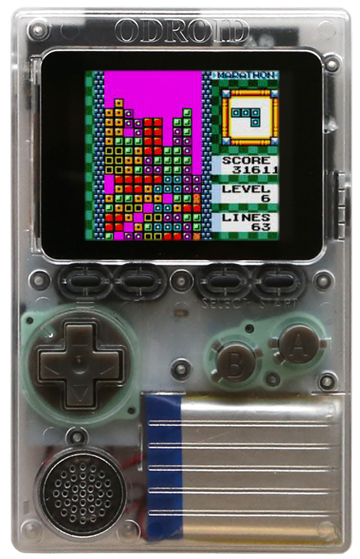
Hello everyone, today’s I am going to talk about how to setup an Odroid Go with the toolchain ESP IDF.
Also have a gp2x and an zx-uno


Hardware:
Software:

Linux & MacOS
cd ~/esp
git clone --recursive https://github.com/espressif/esp-idf.git
cd ~/esp/esp-idf
./install.sh
. $HOME/esp/esp-idf/export.sh
Start a project for esp32
cd ~/esp
cp -r $IDF_PATH/examples/get-started/hello_world .
Connectivity:
Serial ports have the following patterns in their names:
COM1/dev/tty/dev/cu.Linux & MacOS:
cd ~/esp/hello_world
idf.py menuconfig

Build:
idf.py build
In the next parts of the tutorial I will explain how to code c in eclipse or arduino IDE, even the micropython.
Thank you.
This tutorial is to teach how to use vi the editor, the common on every Unix-like systems. This software doesn’t have menu, it’s all about commands.
From Command Mode

    e    Move to end of current word

    $    Move to end of current line

    ^    Move to beginning of current line

    +    Move to beginning of next line

    -    Move to beginning of previous line


    G    Go to last line of the file

    :n   Go to line with this number (:10 goes to line 10)


    <Ctrl>d   Scroll down one-half screen

    <Ctrl>u   Scroll up one-half screen

    <Ctrl>f   Scroll forward one full screen

    <Ctrl>b   Scroll backward one full screen


    )         Move to the next sentence

    (         Move to the previous sentence

    }         Move to the next paragraph

    {         Move to the previous paragraph


    H         Move to the top line of the screen

    M         Move to the middle line of the screen

    L         Move to the last line of the screen


    %         Move to matching bracket:  ( { [ ] } )
2 - Text Mode:
From Command Mode

    i    Insert text before current character

    a    Append text after current character

    I    Begin text insertion at the beginning of a line

    A    Append text at end of a line

    o    Open a new line below current line

    O    Open a new line above current line
3 – Commands & Objects
    Format                         Example

      operator number object          c2w

      number operator object          2cw


    Operators

      c   change

      d   delete

      y   yank


    Objects and Locations

      w           one word forward

      b           one word backward

      e           end of word

      H, M, L     top, middle, or bottom line on screen

      ), (        next sentence, previous sentence

      }, {        next paragraph, previous paragraph

      ^, $        beginning of line, end of line

      /pattern/   forward to pattern