It came for last from Cebek my MP3 encoder/decoder for Arduino and ESP32 or esp8266.
I will start coding for these platforms with it.

It came for last from Cebek my MP3 encoder/decoder for Arduino and ESP32 or esp8266.
I will start coding for these platforms with it.

In this part i will explain how to develop firmware for Odroid Go with an esp32 arduino builtin.
git clone https://github.com/othercrashoverride/odroid-go-firmware.git -b factory
cd odroid-go-firmware/tools/mkfw
make
sudo apt install ffmpeg
ffmpeg -i 86x48px-Arduino_Logo.png -f rawvideo -pix_fmt rgb565 tile.raw
./mkfw test tile.raw 0 16 1048576 app Hello_World.ino.bin
mv firmware.fw Hello_World.fw
Press on B button while is off, then press on while B button is being pressed, then flash with start button the firmware.
Make a data folder in *.bin
mkspiffs -c ./data -b 4096 -p 256 -s 0x100000 spiffs.bin
Two projects in the same *.bin
./mkfw test tile.raw 0 16 1048576 app Weather_Station.ino.bin 1 130 1048576 "spiffs" spiffs.bin
cp firmware.fw Weather_Station.fw
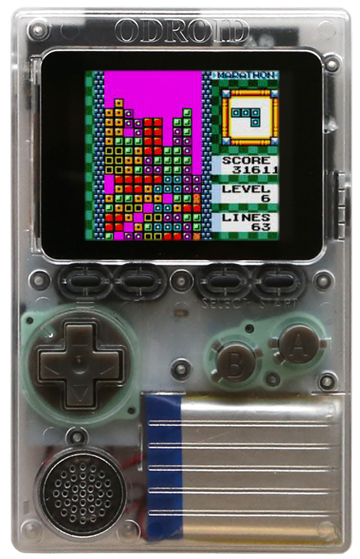
Hello everyone, today’s I am going to talk about how to setup an Odroid Go with the toolchain ESP IDF.
Also have a gp2x and an zx-uno


Hardware:
Software:

Linux & MacOS
cd ~/esp
git clone --recursive https://github.com/espressif/esp-idf.git
cd ~/esp/esp-idf
./install.sh
. $HOME/esp/esp-idf/export.sh
Start a project for esp32
cd ~/esp
cp -r $IDF_PATH/examples/get-started/hello_world .
Connectivity:
Serial ports have the following patterns in their names:
COM1/dev/tty/dev/cu.Linux & MacOS:
cd ~/esp/hello_world
idf.py menuconfig

Build:
idf.py build
In the next parts of the tutorial I will explain how to code c in eclipse or arduino IDE, even the micropython.
Thank you.
Today i will talk about spectrum development on Red Hat and Fedora 30.
First of all I will teach how to install the software through the repositories.
<code>
sudo dnf install z80asm
</code>
Next step will be to install the spectrum Unix emulator called fuse-emulator-gtk.
<code>
sudo dnf install fuse-emulator
</code>
With this way we can now, code basic for spectrum or z80 assembly.
If you have old spectrum computer coding books you can now code it.
create a directory development folder called projects/spectrum
Before this on your home directory:
<code>
vi ~/.vimrc
syntax on
:wq
</code>
<code>
mkdir -p ~/projects/spectrum
touch ~/projects/spectrum/hello.asm
vi ~/projects/spectrum/hello.asm
write this code or copy paste it:
;Sample print at program
ORG 32768
LD A,2
CALL 5633
LD DE,string
LD BC,eostring-string
CALL 8252
RET
string: DEFB 22,0,11,”Hello World”
eostring: equ $
For compilation a asm file from z80 spectrum code type this:
<code>
z80asm -o hello.bin hello.asm
</code>
Chapter 1 – A Brief Introduction to C/C++
This chapter will introduce the reader to the brave world of C and C++. Working with C is not an easy task, it’s a world outside, it takes time to be a good developer on C. I learn C and C++ at high school and I never stopped since then. Sometimes, I took time to achieve my tasks too nowadays. To become a good coder, you must struggle.
The days are to be fought; think you have a goal to be one of them.
This chapter will be brief, I will talk about variables, enumeration, struct, perhaps matrices to 4x4x4, are harder to achieve. As C ansi does not have OOP (Object Oriented Programming), I will talk when I wrote about templating or common use STL.
In C or C++ even on Java, every language has a way to make enclosures, iterations, loops.
In this chapter, I would like to present if/else, while, for(loop).
For instance, an if clause can be to make decisions.
<code>
If(num1>=num2)
return num1;
else
return num2;
</code>
Imagine do you want to make an infinite loop for an Application Non- Ending Loop, being hardcoded like Amiga OS or write hardcoded POSIX software Kernel.
<code>
While(;;)
//do the task;
</code>
Are so many ways to do it. A for loop is more like to run in matrices, think on a matrix, a follow the list. A for loop can be considered to run a list, dictionary a lambda way to sort.
<code>
for(i=0; i<=list[i]; i++)
{
//do the task;
}
</code>
Structs are a sort of function to struct a type of elements with n elements inside
.
struct [structure tag] {
member definition;
member definition;
…
member definition;
} [one or more structure variables];
Struct Books Exemple:
struct Books {
char title[50];
char author[50];
char subject[100];
int book_id;
} book;
Exemple:
#include <stdio.h>
#include <string.h>
struct Books {
char title[50];
char author[50];
char subject[100];
int id_book;
};
int main( ) {
struct Books Book1; /* Declare Book1 of type Book */
struct Books Book2; /* Declare Book2 of type Book */
/* book 1 specification */
strcpy( Book1.title, “C Programming”);
strcpy( Book1.author, “Nuha Ali”);
strcpy( Book1.subject, “C Programming Tutorial”);
Book1.book_id = 6495407;
/* book 2 specification */
strcpy( Book2.title, “Telecom Billing”);
strcpy( Book2.author, “Zara Ali”);
strcpy( Book2.subject, “Telecom Billing Tutorial”);
Book2.book_id = 6495700;
/* print Book1 info */
printf( “Book 1 title : %s\n”, Book1.title);
printf( “Book 1 author : %s\n”, Book1.author);
printf( “Book 1 subject : %s\n”, Book1.subject);
printf( “Book 1 book_id : %d\n”, Book1.id_book);
/* print Book2 info */
printf( “Book 2 title : %s\n”, Book2.title);
printf( “Book 2 author : %s\n”, Book2.author);
printf( “Book 2 subject : %s\n”, Book2.subject);
printf( “Book 2 book_id : %d\n”, Book2.id_book);
return 0;
}
Enum
Enumeration (or enum) is a user defined data type in C. It is mainly used to assign names to integral constants, the names make a program easy to read and maintain.
enum State {
true = 1, false = 0
};
// In both of the below cases, “day” is
// defined as the variable of type week.
enum week{Mon, Tue, Wed};
enum week day;
// Or
enum week{Mon, Tue, Wed, Thur,Fri}day; // An example program to
//demonstrate working
// of enum in C
#include<stdio.h>
enum week{Mon, Tue, Wed, Thur, Fri, Sat, Sun}day;
int main()
{
//enum week day;
day = Wed;
printf(“%d”,day);
return 0;
}
This tutorial is to teach how to use vi the editor, the common on every Unix-like systems. This software doesn’t have menu, it’s all about commands.
From Command Mode

    e    Move to end of current word

    $    Move to end of current line

    ^    Move to beginning of current line

    +    Move to beginning of next line

    -    Move to beginning of previous line


    G    Go to last line of the file

    :n   Go to line with this number (:10 goes to line 10)


    <Ctrl>d   Scroll down one-half screen

    <Ctrl>u   Scroll up one-half screen

    <Ctrl>f   Scroll forward one full screen

    <Ctrl>b   Scroll backward one full screen


    )         Move to the next sentence

    (         Move to the previous sentence

    }         Move to the next paragraph

    {         Move to the previous paragraph


    H         Move to the top line of the screen

    M         Move to the middle line of the screen

    L         Move to the last line of the screen


    %         Move to matching bracket:  ( { [ ] } )
2 - Text Mode:
From Command Mode

    i    Insert text before current character

    a    Append text after current character

    I    Begin text insertion at the beginning of a line

    A    Append text at end of a line

    o    Open a new line below current line

    O    Open a new line above current line
3 – Commands & Objects
    Format                         Example

      operator number object          c2w

      number operator object          2cw


    Operators

      c   change

      d   delete

      y   yank


    Objects and Locations

      w           one word forward

      b           one word backward

      e           end of word

      H, M, L     top, middle, or bottom line on screen

      ), (        next sentence, previous sentence

      }, {        next paragraph, previous paragraph

      ^, $        beginning of line, end of line

      /pattern/   forward to pattern
Bem-vindos ao meu tutorial de shell scripting em linux/unix. O shell scripting é uma forma de executar comandos ou acções através de formas de repetição e de ciclos.
Para esse modo, irei abordar alguns comandos mas, não todos, porque isto é um mundo.
Os scripts irão ser testados no Sabayon 4.2 e no BSD, mach Kernel, isto é, Mac OS X. Podem testá-los nas outras versões de posix, para que se saiba que são executáveis.
Assim, irei apresentar o tutorial. Obrigado.
Para sabermos, como é que funcionam os comando linux/unix podemos escrever este comando:
man nome_do_comando;
Exemplo: man ls.
O man ls irá listar todos os argumentos possíveis do ls. O que é o ls? O ls é o comando para listar as directorias.
Ls: Este comando serve para listar as directorias.
Exemplo: ls /home/user
Assim, o comando lista tudo mas, não mostra os escondidos nem as permissões. Só mostra o que é visível.
Ls -lisa:
Exemplo: ls -lisa /home/user
Desta forma, o ls lista todos os ficheiros daquela directoria com os escondidos e com as devidas permissões.
Mkdir: O comando makedir cria uma pasta ou directoria no local pretendido.
Exemplo: mkdir /home/user/scripts
Com este comando, o utilizador cria na directoria user uma pasta que se chama scripts.
Rmdir: O comando rmdir remove ou apaga como quiserem chamar a pasta pretendida.
Exemplo: rmdir /home/user/scripts
Assim, o utilizador remove a directoria scripts, como anteriormente referido.
Cd: o cd faz com que seja mudado a directoria.
Exemplo: cd /home/user/scripts
Assim, o utilizador está a deslocar-se para a pasta scripts.
Cd ..:
Exemplo: cd ..
Assim, desce um nível da directoria actual.
Who: faz com que sejam apresentados os utilizadores.
Exemplo: who
vi: isto é um comando que se direcciona para um editor de texto que trabalha na consola directamente.
Exemplo: vi nome_do_ficheiro.extensão ou sem extensão.
Chmod: este comando modifica os modos de utilização dos ficheiros.
Exemplos: chmod +x nome_do_ficheiro.
Assim, está a tornar o ficheiro como executável.
Chmod 777 nome_do_ficheiro
com o número 777 está a dar permisssões ao owner, others e groups. É mau porque, assim todos têm permissões de acesso ao ficheiro.
Os scripts quando são criados temos que pôr logo, na primeira linha este comentário:
#!/bin/sh
Com este comentário, o interpretador de shell irá interpretá-lo como um script dessa mesma shell.
O comentário faz-se desta forma: #
variável é da seguinte maneira: variável=”valor”
a escrita para o monitor é: echo ”mensagem que queremos apresentar”
ler do teclado: read variável
Há mais tipos de comandos, mas irei abordá-los através dos scripts.
Agora começarei a explicar o funcionamento dos scripts em shell.
Primeiro escrevemos, pode ser no editor de texto do gnome, o seguinte comentário:
#!/bin/sh
Dentro do script podemos fazer administração e automatização dos scripts e funcionalidades pretendidas.
Os ficheiros podem ser escritos, sem extensão ou com extensão. Com extensão podem ser bin,sh.
Exemplo de um script simples:
#!/bin/sh
echo “ola mundo”
Gravamos com a extensão .sh ou sem extensão e com o nome hello. Porque iremos fazer o seguinte comando e para todos eles:
chmod +x hello.sh ou chmod +x hello
Agora, iremos executá-lo da seguinte maneira:
./hello.sh ou ./hello
E a mensagem que é apresentada é ola mundo.
Outra forma de o fazer é criar uma variável com o valor “ola mundo” e depois fazer um echo da variável.
Exemplo:
#!/bin/sh
#variavel
ola=”ola mundo”
echo $ola
O cifrão é para indicar que é uma variável.
E assim, temos outra forma de o fazer com variáveis.
Vamos falar de formas de selecção. Existe o if e o case.
O if é uma forma de selecção para escolher várias opções. E o case também é uma forma de selecção mas com várias opções e com uma opção default, digamos assim.
Exemplo de uma estrutura if:
#!/bin/sh
if test -e $1;
then
echo “o ficheiro existe”
else
echo “o ficheiro não existe”
fi
Salvar o ficheiro com o nome ficheiro_existe. Fazer o chmod +x ficheiro_existe. Executá-lo da seguinte maneira: ./ficheiro_existe /home/user/nome_do_ficheiro
Isto é um exemplo, e é aplicável para outras directorias e ficheiros de todo o sistema de ficheiros do linux/unix.
Irei, agora tratar o caso do case.
Exemplo;
#!/bin/sh
case “$variavel” in
*) echo “opcao invalida”;;
esac
já explicarei o case, porque não consigo explicá-lo sem usar funções. Por isso, vou falar de funções.
A sintaxe de uma funcão é:
sair(){
exit 1
}
Assim, irei mostrar uma forma de case aplicável.
#!/bin/sh
# funcoes sair lista limpar e principal
sair(){
exit 1
}
lista(){
ls -lisa $1|more
}
limpar(){
clear
}
principal(){
echo -n “escolha uma das opcoes”
echo “1. lista”
echo “2. limpar o ecran”
echo “3. sair do programa”
read opcao
case $opcao in
1)lisa;;
*) echo “opcao invalida”: exit 1;;
esac
}
#menu principal
principal
Há várias formas de ciclos. Eles são o while, do, for e o until. Cada um tem a sua forma de fazer interações ou ciclos.
Sintaxe do while:
while condicao
do
bloco de instrucoes;
done
exemplo prático de um while:
ver =”n”
while [$ver !=”y”]
do
read ver
echo “introduza uma opcao”
read opcao
echo “e esta a $opcao correcta (y/n)”
read ver
done
o until corre enquanto é verdade.
Sintaxe:
until condicao_verdadeira
do
bloco de instrucoes;
done
Exemplo também prático:
#!/bin/sh
until [-z $1]
do
ls -lisa $1|more
done
A sintaxe do for é:
for variavel [in lista]
do
bloco_de_instruções;
done
Exemplo de um for:
#!/bin/sh
#comeco do programa
for i in pedro,1,sara,luis;do
echo “a lista é: $i”
done
Espero que tenha sido produtivo para a vossa formação em scripting nos sistemas linux/unix.
Agora é convosco para as ideias de scripts. Irei falar de scripting gráfico, mas para isso tenho de estudar melhor a função Xdialog. Para esse fim, podem “googlar” acerca dessa matéria.
Vou introduzir mais comandos para que possam conhecer e ter o “bichinho” do scripting shell para a vossa função de administração.
Exemplos de comandos interessantes:
ping:
ping ip_do_destino
ping endereco_de_destino
man ping para visualizar os parâmetros
rm:
rm nome_do_ficheiro
man rm para visualizar os parâmetros
date:
date
date +”ola são %H e %M”
tail:
tail -n numero a visualizar nome_do_ficheiro
man tail para visualizar os parâmetros
more:
more nome_do_ficheiro
man more para visualizar os parâmetros
Podem também usar o pipe, isto é, agregar comandos, instruções numa linha só,
Exemplo:
ls -lisa directorio_de_destino|more
Espero que eu tenha esclarecido e tenha tirado algumas dúvidas que tenham. Espero também que haja mais tutoriais meus a explicar como este. Em breve irei escrever um tutorial a explicar como é que se usa o Xdialog.
Hello Everyone!
One of these days I decided to solve a sort of data with C, using c99.
I tried to solve it as a issue for my filesystem implementations.
<
bubble (item,count)
char *item;
int count;
{
register int a,b;
register char t;
for(a=1;a
As I did the workaround.
Hello everyone!
Today I will be talking about ELF, a format used well used nowadays on micro technology although on open systems already in use on the market.
<code>
#include <stdio>
#include <iostream>
int main()
{
printf(“hello world\n”);
return 0;
}
</code>
gcc -o main.c a.out
This is our example to use and verify ELF format. It’s a format used since 1999, as a standard. It can be called a standardisation.
With ELF we can, debug, study how the behaviour of the system have under the CPU and the format CPU smp. It can run on 32 bit and 64 bit cpu.
In Linux if you want to have a describe style for the format, you can run this command on the terminal or in MacOS (Terminal or iTerm2)
<code>
file a.out or the name you gave file main.out
</code>
To make use of debugging under ELF format is useful to study how the Operating System behaves. Perhaps the libraries are built or their behave too.
I was messing around with sap Leonardo, trying to do a web ui application in the last 2 days. Even coding db schemas and flutter through the process.
In the last couple of days with WebIDE i think and I thought to mess with code and software itself. I thought that I can do an app ouside and import it. For that purpose I decided to use a flutter dart and html5 uI, the exact same template.
To learn for me is trying to hack or do a hackathon behind the glance of the beauty.
In the following article I will show how I done it or I tried it to be successful.
I got a weird file. Attached with this article relied on sapui5.