Category: macOS

  • ringsCE #2 (En Castellano)

    Vamos a aprender a hackear RingsCE en nuestras máquinas MacBook M1+.

    Claro, desglosamos el archivo CMakeLists.txt para el proyecto Kayte Lang:

    Versión de CMake y Definición del Proyecto

    cmake_minimum_required(VERSION 3.29)
    project(Kayte-lang VERSION 0.1.0 LANGUAGES CXX kayte)
    • cmake_minimum_required(VERSION 3.29): Especifica que se requiere la versión 3.29 o superior de CMake.
    • project(Kayte-lang VERSION 0.1.0 LANGUAGES CXX kayte): Define el nombre del proyecto como "Kayte-lang" con la versión 0.1.0. El proyecto utiliza C++ (CXX) y un lenguaje personalizado kayte.

    Características de Qt y Estándar de C++

    set(CMAKE_AUTOUIC ON)
    set(CMAKE_AUTOMOC ON)
    set(CMAKE_AUTORCC ON)
    set(CMAKE_INCLUDE_CURRENT_DIR ON)
    • Estas configuraciones habilitan el manejo automático de características de Qt:
      • CMAKE_AUTOUIC: Procesa automáticamente archivos .ui.
      • CMAKE_AUTOMOC: Maneja automáticamente el Meta-Object Compiler de Qt.
      • CMAKE_AUTORCC: Procesa automáticamente archivos de recursos de Qt.
      • CMAKE_INCLUDE_CURRENT_DIR: Incluye los directorios de origen y binarios actuales en la ruta de inclusión.
    set(CMAKE_CXX_STANDARD 17)
    set(CMAKE_CXX_STANDARD_REQUIRED ON)
    • set(CMAKE_CXX_STANDARD 17): Especifica que se debe usar el estándar C++17.
    • set(CMAKE_CXX_STANDARD_REQUIRED ON): Asegura que el estándar C++ especificado es obligatorio.

    Configuraciones Específicas de la Plataforma

    if(ANDROID)
        set(CMAKE_SYSTEM_NAME Android)
        set(CMAKE_SYSTEM_VERSION 21)
    elseif(APPLE)
        if(IOS)
            set(CMAKE_SYSTEM_NAME iOS)
            set(CMAKE_OSX_ARCHITECTURES "arm64")
            set(CMAKE_IOS_DEPLOYMENT_TARGET 15.0)
        else()
            set(CMAKE_SYSTEM_NAME macOS)
            set(CMAKE_OSX_ARCHITECTURES "arm64")
            set(CMAKE_OSX_DEPLOYMENT_TARGET 11.0)
        endif()
    elseif(UNIX AND NOT APPLE)
        set(CMAKE_SYSTEM_NAME Linux)
        if(CMAKE_SYSTEM_PROCESSOR STREQUAL "aarch64")
            set(CMAKE_SYSTEM_PROCESSOR arm64)
        endif()
    else()
        message(FATAL_ERROR "Unsupported platform")
    endif()
    • Esta sección establece los requisitos mínimos para diferentes plataformas:
      • Android: Requiere API nivel 21 o superior.
      • Apple (iOS y macOS): Especifica la arquitectura (arm64) y los objetivos de despliegue.
      • Linux: Maneja diferentes procesadores, especialmente ARM64.

    Funcionalidad de Verificación de Directorios

    set(DIRECTORIES
        "dir1"
        "dir2"
        "dir3"
        "dir4"
        "dir5"
        "dir6"
        "dir7"
        "dir8"
        "dir9"
    )
    • Define una lista de directorios a verificar.
    function(check_directory dir)
        if(IS_DIRECTORY ${dir})
            message(STATUS "Directory found: ${dir}")
            set(DIR_${dir}_FOUND ON PARENT_SCOPE)
        else()
            message(STATUS "Directory not found: ${dir}")
            set(DIR_${dir}_FOUND OFF PARENT_SCOPE)
        endif()
    endfunction()
    • check_directory: Función que verifica si un directorio existe y establece una bandera en consecuencia.
    foreach(dir ${DIRECTORIES})
        check_directory(${dir})
    endforeach()
    • Recorre la lista de directorios y verifica cada uno.

    Directorios de Salida e Inclusión/Vinculación

    foreach(dir ${DIRECTORIES})
        if(DIR_${dir}_FOUND)
            message(STATUS "${dir} is present.")
        else()
            message(STATUS "${dir} is not present.")
        endif()
    endforeach()
    • Muestra los resultados de las verificaciones de directorios.
    foreach(dir ${DIRECTORIES})
        if(DIR_${dir}_FOUND)
            include_directories(${dir})
        endif()
    endforeach()
    • Incluye los directorios que se encuentran.

    Ejemplo de Objetivo

    #add_executable(example main.cpp)
    • Define un objetivo ejecutable llamado example usando main.cpp al final.
    foreach(dir ${DIRECTORIES})
        if(DIR_${dir}_FOUND)
            target_link_libraries(example ${dir})
        endif()
    endforeach()
    • Vincula los directorios al objetivo example si se encuentran.

    Resumen

    Este archivo CMakeLists.txt configura un proyecto CMake para Kayte Lang con las siguientes características clave:

    • Requiere CMake 3.29 o superior.
    • Configura el proyecto con C++ y un lenguaje personalizado kayte.
    • Habilita características automáticas de Qt.
    • Requiere el estándar C++17.
    • Especifica configuraciones específicas de la plataforma para Android, iOS, macOS y Linux.
    • Verifica la existencia de directorios especificados.
    • Incluye y vincula directorios según su existencia.
    • Define un objetivo ejecutable de ejemplo y lo vincula a los directorios encontrados.

    Este archivo de encabezado define las instrucciones de bytecode para la máquina virtual Kayte Lang. Vamos a repasarlo paso a paso:

    Guardas de Encabezado

    #ifndef BYTECODE_INSTRUCTIONS_H
    #define BYTECODE_INSTRUCTIONS_H
    • Guardas de encabezado: Se utilizan para prevenir múltiples inclusiones del mismo archivo de encabezado, lo que puede causar errores de compilación. #ifndef verifica si BYTECODE_INSTRUCTIONS_H no está definido, y si no lo está, lo define. Esto asegura que el contenido entre estas guardas se incluya solo una vez.

    Enumeración de Instrucciones de Bytecode

    enum class BytecodeInstruction {
        NOP,        // No operation
        HALT,       // Halt execution
        PUSH,       // Push a value onto the stack
        POP,        // Pop a value from the stack
        ADD,        // Add two values from the stack
        SUBTRACT,   // Subtract two values from the stack
        MULTIPLY,   // Multiply two values from the stack
        DIVIDE,     // Divide two values from the stack
        PRINTLN     // Print a value from the stack
    };
    • enum class BytecodeInstruction: Esto define una enumeración llamada BytecodeInstruction usando enum class para asegurar la seguridad de tipos y para encerrar los enumeradores dentro de BytecodeInstruction.
    • Cada enumerador representa una instrucción diferente que la máquina virtual puede ejecutar:
      • NOP: Sin operación. La VM no hace nada cuando encuentra esta instrucción.
      • HALT: Detiene la ejecución del bytecode. Se utiliza para detener la VM.
      • PUSH: Empuja un valor en la pila. Se utiliza para añadir un valor a la pila.
      • POP: Saca un valor de la pila. Esto elimina el valor superior de la pila.
      • ADD: Suma los dos valores superiores de la pila, empuja el resultado de nuevo en la pila.
      • SUBTRACT: Resta los dos valores superiores de la pila, empuja el resultado de nuevo en la pila.
      • MULTIPLY: Multiplica los dos valores superiores de la pila, empuja el resultado de nuevo en la pila.
      • DIVIDE: Divide los dos valores superiores de la pila, empuja el resultado de nuevo en la pila.
      • PRINTLN: Imprime el valor superior de la pila. Esto es útil para depuración o propósitos de salida.

    Fin de las Guardas de Encabezado

    #endif // BYTECODE_INSTRUCTIONS_H
    • Esto marca el final de la guarda de encabezado. Cierra el condicional que comenzó con #ifndef, asegurando que el contenido entre las guardas se incluya solo una vez.

    Resumen del Encabezado

    Este archivo de encabezado define un conjunto de instrucciones para una máquina virtual de bytecode en el proyecto Kayte Lang. Estas instrucciones incluyen operaciones básicas como aritmética (suma, resta, multiplicación, división), manipulación de pila (empujar, sacar) y operaciones de control (sin operación, detener, imprimir). El uso de un enum class asegura que estas instrucciones sean seguras en cuanto a tipos y encapsuladas, haciendo el código más robusto y fácil de mantener.

    Uso del Archivo de Configuración de Doxygen (Doxyfile)

    Un archivo de configuración de Doxygen, a menudo llamado Doxyfile, se utiliza para generar documentación a partir del código fuente anotado. Aquí, el Doxyfile proporcionado está personalizado para el proyecto Kaytana. Vamos a desglosar sus secciones y configuraciones clave.

    Configuraciones Relacionadas con el Proyecto

    PROJECT_NAME           = Kaytana
    PROJECT_NUMBER         = 1.0
    PROJECT_BRIEF          = "Object Pascal Interpreter with
    
     AI Assistance"
    OUTPUT_DIRECTORY       = @CMAKE_BINARY_DIR@/doxygen
    OUTPUT_LANGUAGE        = English
    • PROJECT_NAME: El nombre del proyecto (Kaytana).
    • PROJECT_NUMBER: El número de versión (1.0).
    • PROJECT_BRIEF: Una breve descripción del proyecto.
    • OUTPUT_DIRECTORY: Especifica dónde se generará la documentación. @CMAKE_BINARY_DIR@ es un marcador de posición que CMake reemplazará con la ruta del directorio de compilación actual.
    • OUTPUT_LANGUAGE: El idioma de la documentación (Inglés).

    Configuraciones Relacionadas con la Construcción

    EXTRACT_ALL            = YES
    EXTRACT_PRIVATE        = NO
    SHOW_INCLUDE_FILES     = YES
    • EXTRACT_ALL: Si se establece en YES, todas las entidades se documentarán, incluso aquellas sin comentarios de documentación.
    • EXTRACT_PRIVATE: Si se establece en NO, los miembros privados de las clases no se incluirán en la documentación.
    • SHOW_INCLUDE_FILES: Si se establece en YES, la documentación mostrará qué archivos están incluidos en cada archivo fuente.

    Configuraciones Relacionadas con la Entrada

    INPUT                  = @CMAKE_SOURCE_DIR@/src
    FILE_PATTERNS          = *.cpp *.h
    RECURSIVE              = YES
    • INPUT: Especifica los directorios o archivos a procesar. @CMAKE_SOURCE_DIR@ es un marcador de posición que CMake reemplazará con la ruta del directorio fuente actual.
    • FILE_PATTERNS: Especifica los patrones de archivos a incluir (archivos fuente y de encabezado de C++).
    • RECURSIVE: Si se establece en YES, se incluirán los subdirectorios.

    Configuraciones Relacionadas con el Navegador de Código Fuente

    SOURCE_BROWSER         = YES
    INLINE_SOURCES         = YES
    • SOURCE_BROWSER: Si se establece en YES, permite la navegación del código fuente dentro de la documentación generada.
    • INLINE_SOURCES: Si se establece en YES, incluye el código fuente en la documentación.

    Configuraciones Relacionadas con el Formato de Salida

    GENERATE_HTML          = YES
    HTML_OUTPUT            = html
    HTML_TIMESTAMP         = YES
    SEARCHENGINE           = YES
    • GENERATE_HTML: Si se establece en YES, genera documentación en formato HTML.
    • HTML_OUTPUT: Especifica el directorio dentro del directorio de salida donde se colocarán los archivos HTML.
    • HTML_TIMESTAMP: Si se establece en YES, incluye una marca de tiempo en los archivos HTML generados.
    • SEARCHENGINE: Si se establece en YES, incluye una función de búsqueda en la documentación HTML.

    Gráficos y Diagramas

    CLASS_DIAGRAMS         = YES
    CALL_GRAPH             = YES
    CALLER_GRAPH           = YES
    • CLASS_DIAGRAMS: Si se establece en YES, genera diagramas de clases.
    • CALL_GRAPH: Si se establece en YES, genera gráficos de llamadas (quién llama a quién).
    • CALLER_GRAPH: Si se establece en YES, genera gráficos de llamadores (quién es llamado por quién).

    Personalización para Uso con CMake

    • El archivo de configuración utiliza marcadores de posición como @CMAKE_BINARY_DIR@ y @CMAKE_SOURCE_DIR@. Estos marcadores son reemplazados por CMake con las rutas reales cuando se configura el proyecto.

    Resumen

    Este Doxyfile está configurado para generar documentación completa para el proyecto Kaytana. Incluye configuraciones para detalles del proyecto, fuentes de entrada, opciones de construcción y formatos de salida. La configuración asegura que la documentación será exhaustiva, incluyendo navegación del código fuente, diagramas y un motor de búsqueda.

    Aprender a Hackear RingsCE con Kayte Lang

    Los artículos sobre RingsCE están diseñados para ayudar a los usuarios a entender cómo personalizar y extender el motor RingsCE usando Kayte Lang. Siguiendo estas guías, los desarrolladores pueden aprender a:

    • Modificar el motor RingsCE para adaptarlo a las necesidades específicas del proyecto.
    • Integrar nuevas características y mejoras utilizando las capacidades de Kayte Lang.
    • Utilizar las herramientas y bibliotecas proporcionadas para agilizar el desarrollo.

    Estos artículos cubrirán temas como:

    • Configuración del entorno de desarrollo para Kayte Lang.
    • Escribir y compilar scripts personalizados.
    • Integración de bibliotecas de terceros.
    • Depuración y optimización del rendimiento.

    Aprovechando estos recursos, los desarrolladores pueden hackear y mejorar efectivamente el motor RingsCE, creando soluciones a medida para sus proyectos de juegos.

  • ringsCE #1 (En castellano)

    # Uso de Git para Control de Versiones y Herramientas RingsCE para Desarrollo de Juegos en Pascal
    
    ## Introducción
    
    Git es un potente sistema de control de versiones que permite a los desarrolladores gestionar y rastrear cambios en sus proyectos de manera efectiva. Junto con RingsCE Tools, un kit de herramientas de código abierto para el desarrollo de juegos en Pascal, puedes optimizar tu flujo de trabajo y crear juegos increíbles con facilidad. En esta guía, te explicaremos los conceptos básicos de Git, incluyendo la clonación de repositorios y el mantenimiento de tus proyectos, además de destacar cómo RingsCE Tools puede mejorar tu experiencia en el desarrollo de juegos en Pascal.
    
    ## Conceptos Básicos de Git
    
    ### Instalación
    
    Para empezar con Git, necesitarás instalarlo en tu sistema. Puedes descargar Git desde el sitio web oficial y seguir las instrucciones de instalación para tu sistema operativo.
    
    ### Clonación de un Repositorio
    
    Para clonar un repositorio de Git, navega al directorio donde quieres almacenar el proyecto y ejecuta el siguiente comando:
    
    ```bash
    git clone https://www.github.com/ringsce/ekron-realms.git

    Realización de Cambios

    Una vez que hayas clonado un repositorio, puedes realizar cambios en los archivos de tu copia local. Usa un editor de texto o un entorno de desarrollo integrado (IDE) para modificar los archivos según tus necesidades.

    Confirmación de Cambios

    Después de realizar cambios en los archivos, necesitarás confirmarlos en el repositorio de Git. Esto crea una instantánea del proyecto en un punto específico en el tiempo. Usa los siguientes comandos para confirmar tus cambios:

    git add .
    git commit -m "Tu mensaje de confirmación aquí"

    Reemplaza `"Tu mensaje de confirmación aquí"` con una breve descripción de los cambios que has realizado.

    Envío de Cambios

    Para compartir tus cambios con otros o sincronizarlos con un repositorio remoto, necesitarás enviar tus confirmaciones. Usa el siguiente comando para enviar tus cambios al repositorio remoto:

    git push

    Herramientas RingsCE para Desarrollo de Juegos en Pascal

    RingsCE Tools es un kit de herramientas de código abierto diseñado para optimizar el desarrollo de juegos en Pascal. Proporciona una gama de características y utilidades para simplificar el proceso de desarrollo y mejorar la productividad.

    Características

    • Gestión de Activos: Gestiona fácilmente activos como gráficos, efectos de sonido y archivos de música dentro de tu proyecto.
    • Optimización de Código: Optimiza tu código Pascal para mejorar el rendimiento y la eficiencia.
    • Compatibilidad Multiplataforma: Crea juegos que funcionen en múltiples plataformas, incluyendo Windows, macOS y Linux.
    • Integración con Git: Integra fácilmente RingsCE Tools con Git para control de versiones y colaboración.

    Primeros Pasos

    Para comenzar a usar RingsCE Tools en tus proyectos de desarrollo de juegos en Pascal, sigue estos pasos:

    1. Instala Free Pascal y Lazarus IDE: Descarga e instala Free Pascal y Lazarus IDE, que son compatibles con RingsCE Tools.

    2. Clona el Repositorio de RingsCE Tools: Usa Git para clonar el repositorio de RingsCE Tools en tu máquina local.

    3. Integra RingsCE Tools con tus Proyectos: Importa RingsCE Tools en tus proyectos de juegos en Pascal y comienza a usar sus características para optimizar tu flujo de trabajo de desarrollo.

    Conclusión

    Git y RingsCE Tools son herramientas poderosas que pueden ayudarte a gestionar tus proyectos de manera eficiente y crear increíbles juegos en Pascal. Al dominar los conceptos básicos de Git y aprovechar las características de RingsCE Tools, puedes llevar tus habilidades de desarrollo de juegos al siguiente nivel y crear experiencias de juego inmersivas que cautiven a jugadores de todo el mundo.

  • ringsCE #5

    Welcome to the fifth edition of ringsCE, your go-to source for the latest advancements and insights into the ringsCE framework. In this issue, we delve into the critical aspect of source code synchronization and explore how ringsCE integrates seamlessly with macOS and the newly released FreeBSD 14. Our focus remains on fostering an open and collaborative development environment powered by the versatile languages of D, ANSI C, and the robust frameworks of Qt 5 and 6.

    As software development evolves, the synchronization of source code across different platforms becomes increasingly crucial. This edition provides an in-depth look at the methodologies and tools that facilitate this synchronization, ensuring consistency, reliability, and efficiency in your development processes. By leveraging the strengths of macOS and FreeBSD 14, ringsCE continues to expand its capabilities, offering developers a more integrated and cohesive framework.

    In addition, we will focus on utilizing the system APIs from UNIX pipelines and other essential tools within D, ANSI C, and Qt. You will learn practical coding techniques that harness the power of these APIs, enabling you to create efficient and effective applications. This hands-on approach will guide you through the nuances of system-level programming, making it easier to integrate and manage complex processes within the ringsCE framework.

    Discover how ringsCE’s commitment to openness and cross-platform compatibility enhances your development workflow, whether you’re working on a Mac or exploring the robust features of FreeBSD 14. Join us as we uncover the innovations and improvements that make ringsCE a powerful choice for modern software development.

    Getting Started: Cloning Sources and Preparing for System Pipelines and Driver Code Development

    Welcome to this practical guide on getting started with the ringsCE framework by cloning source code repositories. In this article, we will walk you through the process of checking out the sources from both SVN and Git repositories. This will serve as your foundation for developing system pipelines and new driver code for macOS and FreeBSD 14.

    To begin, you’ll need to clone the necessary source code repositories. Follow these steps to get the code on your local machine:

    Cloning the Source Code from SVN

    First, we will use SVN to check out the Open Krita source code. Open your terminal and run the following command:

    svn checkout https://svn.code.sf.net/p/openkrita/code/ openkrita-code

    This command will create a directory named openkrita-code and download the complete source code from the specified SVN repository into this directory. Ensure you have SVN installed on your system before running the command.

    Cloning the Source Code from Git

    Next, we will clone the FreeBSD source mirror using Git. In your terminal, execute the following command:

    git clone https://github.com/ringsce/freebsd-src-mirror.git

    This will create a directory named freebsd-src-mirror and clone the repository into it. Make sure you have Git installed on your system to perform this operation.

    Preparing for Coding

    With both source repositories cloned, you now have a solid starting point for your development work. These repositories contain essential code and resources that will help you build system pipelines and develop new driver code for macOS and FreeBSD 14.

    In our next article, we will delve deeper into building system pipelines. We will explore how to leverage the power of UNIX pipelines and other system APIs using D, ANSI C, and Qt. Additionally, we will guide you through the process of writing and integrating new driver code, ensuring seamless compatibility with macOS and FreeBSD 14.

    Stay tuned as we continue to enhance your development skills with practical, hands-on tutorials and in-depth insights into the ringsCE framework. Whether you are a seasoned developer or just starting, these guides will provide the knowledge and tools you need to succeed.

  • ringsCE #4

    Hello readers,

    Today, we are going to learn how to use VSCode with D. We are going to see how to use libraries and its symlinks for VSCode under macOS.

    Welcome to ringsCE

    At ringsCE, we are at the forefront of innovation in the gaming and development world, bringing together the power of C and D languages to create robust and efficient solutions. Our mission is to deliver exceptional products and services that cater to the diverse needs of developers and gamers alike.

    The Convergence of C and D Languages

    The C language, known for its performance and control, has been a staple in the development community for decades. D, on the other hand, is a modern language that builds upon C’s strengths while introducing advanced features such as garbage collection, concurrency, and a powerful type system. At ringsCE, we harness the synergy of C and D to develop solutions that are both high-performing and easy to maintain.

    Cutting-Edge Frontend Development with vibe.d

    To enhance our offerings, we utilize vibe.d, a high-performance web framework for the D language. With vibe.d, we deliver sophisticated frontend applications for ringsCE cloud services, ensuring a seamless and responsive user experience. This combination allows us to create dynamic, scalable, and secure web applications that meet the highest standards of modern development.

    Our Services

    Games

    Discover a wide array of games across various genres and platforms, curated to provide the best gaming experience.

    Development Solutions

    Leverage our expertise in C and D languages to access:

    • Custom Development: Tailored solutions to meet your specific needs.
    • Pre-built Modules: Ready-to-use code components for faster project delivery.
    • Consulting Services: Professional guidance to optimize your development process.

    In order to streamline your development workflow and ensure that you have easy access to essential tools, you can create symbolic links for the LDC compiler and DUB, the D language’s package manager, directly in your system’s local bin directory. This enables you to invoke these tools from anywhere in your terminal without needing to specify their full paths.

    Setting Up Symbolic Links

    To set up the symbolic links for the LDC compiler and DUB, you will use the following commands:

    1. Linking the LDC Compiler:

      sudo ln -f -s /path/to/ldc/compiler/bin/ldc2 /usr/local/bin/ldc2

      This command creates a symbolic link for the ldc2 compiler, making it accessible system-wide as ldc2. The -f option forces the link creation by removing any existing destination file, and the -s option indicates that a symbolic link should be created.

    2. Linking DUB:

      sudo ln -f -s /path/to/ldc/compiler/bin/dub /usr/local/bin/dub

      Similarly, this command creates a symbolic link for dub, enabling you to run it from any directory with ease. Just like the previous command, the -f option forces the link creation, and the -s option specifies that it should be a symbolic link.

    Benefits

    By executing these commands, you ensure that both ldc2 and dub are readily available from the command line, simplifying the development process. This setup is particularly useful for projects that involve frequent compilation and package management tasks, allowing for more efficient and organized development.

    Execute these commands in your terminal to streamline your D language development environment:

    sudo ln -f -s /path/to/ldc/compiler/bin/ldc2 /usr/local/bin/ldc2
    sudo ln -f -s /path/to/ldc/compiler/bin/dub /usr/local/bin/dub

    With these symbolic links in place, you can leverage the full power of the LDC compiler and DUB package manager, enhancing your productivity and ease of use.


    As you can see on VSCode for macOS. We are working on a Sonoma m2 MBAir.


  • ringsCE #3


    Kreatyve Designs: Pioneering POSIX System-Level Applications with C and D

    At Kreatyve Designs, we are committed to pushing the boundaries of software development by harnessing the power of cutting-edge technologies. Our latest endeavor involves building robust POSIX system-level applications using the dynamic duo of C and D programming languages.

    Why POSIX?

    POSIX (Portable Operating System Interface) is a family of standards specified by the IEEE for maintaining compatibility between operating systems. It defines the application programming interface (API), along with command line shells and utility interfaces, to ensure software portability across different Unix-like operating systems. By adhering to POSIX standards, Kreatyve Designs ensures that our applications are versatile, reliable, and compatible with a wide range of platforms.

    The Power of C and D

    C: The Tried and True

    C has long been the cornerstone of system-level programming. Its close-to-the-metal nature allows for fine-grained control over hardware resources, making it the ideal choice for developing high-performance, efficient, and reliable system software. C’s extensive use in operating systems, compilers, and embedded systems is a testament to its enduring power and flexibility.

    D: The Modern Marvel

    While C remains indispensable, D brings a fresh perspective to system-level programming. D is designed to combine the performance and control of C with the productivity and ease of modern programming languages. With features like garbage collection, contract programming, and a robust standard library, D simplifies many of the complexities inherent in system-level programming. Its interoperability with C code makes it a perfect companion for developing advanced POSIX applications.

    How Kreatyve Designs Utilizes C and D

    At Kreatyve Designs, we leverage the strengths of both C and D to build powerful POSIX-compliant applications. Here’s how:

    System Call Integration

    Our applications require efficient and direct interaction with the operating system. By utilizing POSIX system calls, we ensure that our applications can perform critical tasks such as process control, file manipulation, and inter-process communication seamlessly across different Unix-like systems.

    For instance, here’s a simple example of a POSIX system call in D:

    import core.sys.posix.unistd;
    
    void main() {
        ssize_t bytesWritten = write(STDOUT_FILENO, "Hello, POSIX!\n", 14);
        if (bytesWritten == -1) {
            // Handle error
        }
    }

    This code snippet demonstrates how D can interact with the POSIX API to perform a basic write operation to the standard output.

    Combining C and D

    One of the standout features of D is its interoperability with C. This allows us to use existing C libraries and codebases seamlessly within our D applications. By combining the raw power of C with the modern features of D, we can create more maintainable and scalable system-level applications.

    For example, we might use C for performance-critical components and D for higher-level logic, benefiting from D’s modern syntax and powerful abstractions:

    // C code (system_calls.c)
    #include <unistd.h>
    
    void c_write(const char *message) {
        write(STDOUT_FILENO, message, sizeof(message));
    }
    // D code (main.d)
    extern(C) void c_write(const char* message);
    
    void main() {
        c_write("Hello from C!\n");
    }

    Advanced Features and Productivity

    D’s advanced features like garbage collection, module system, and powerful metaprogramming capabilities enable us to write cleaner and more robust code. This enhances productivity and allows our developers to focus on solving complex problems rather than dealing with low-level intricacies.

    Conclusion

    At Kreatyve Designs, we believe in the synergy of tradition and innovation. By combining the time-tested reliability of C with the modern elegance of D, we are crafting state-of-the-art POSIX system-level applications that are both powerful and adaptable. As we continue to explore the possibilities, we are excited to deliver software solutions that meet the highest standards of performance, compatibility, and reliability.

    Stay tuned for more updates on our journey with C and D in the world of POSIX system programming!


  • ringsCE #2

    We are going to learn how to hack ringsCE on our m1+ macbook machines.

    Sure, let’s break down the CMakeLists.txt file for the Kayte Lang project:

    CMake Version and Project Definition

    cmake_minimum_required(VERSION 3.29)
    project(Kayte-lang VERSION 0.1.0 LANGUAGES CXX kayte)
    • cmake_minimum_required(VERSION 3.29): Specifies that CMake version 3.29 or higher is required.
    • project(Kayte-lang VERSION 0.1.0 LANGUAGES CXX kayte): Defines the project name as "Kayte-lang" with version 0.1.0. The project uses C++ (CXX) and a custom language kayte.

    Qt Features and C++ Standard

    set(CMAKE_AUTOUIC ON)
    set(CMAKE_AUTOMOC ON)
    set(CMAKE_AUTORCC ON)
    set(CMAKE_INCLUDE_CURRENT_DIR ON)
    • These settings enable automatic handling of Qt features:
      • CMAKE_AUTOUIC: Automatically process .ui files.
      • CMAKE_AUTOMOC: Automatically handle Qt’s Meta-Object Compiler.
      • CMAKE_AUTORCC: Automatically process Qt resource files.
      • CMAKE_INCLUDE_CURRENT_DIR: Include the current source and binary directories in the include path.
    set(CMAKE_CXX_STANDARD 17)
    set(CMAKE_CXX_STANDARD_REQUIRED ON)
    • set(CMAKE_CXX_STANDARD 17): Specifies that the C++17 standard should be used.
    • set(CMAKE_CXX_STANDARD_REQUIRED ON): Ensures that the specified C++ standard is required.

    Platform-Specific Settings

    if(ANDROID)
        set(CMAKE_SYSTEM_NAME Android)
        set(CMAKE_SYSTEM_VERSION 21)
    elseif(APPLE)
        if(IOS)
            set(CMAKE_SYSTEM_NAME iOS)
            set(CMAKE_OSX_ARCHITECTURES "arm64")
            set(CMAKE_IOS_DEPLOYMENT_TARGET 15.0)
        else()
            set(CMAKE_SYSTEM_NAME macOS)
            set(CMAKE_OSX_ARCHITECTURES "arm64")
            set(CMAKE_OSX_DEPLOYMENT_TARGET 11.0)
        endif()
    elseif(UNIX AND NOT APPLE)
        set(CMAKE_SYSTEM_NAME Linux)
        if(CMAKE_SYSTEM_PROCESSOR STREQUAL "aarch64")
            set(CMAKE_SYSTEM_PROCESSOR arm64)
        endif()
    else()
        message(FATAL_ERROR "Unsupported platform")
    endif()
    • This section sets minimum requirements for different platforms:
      • Android: Requires API level 21 or higher.
      • Apple (iOS and macOS): Specifies architecture (arm64) and deployment targets.
      • Linux: Handles different processors, especially ARM64.

    Directory Checking Functionality

    set(DIRECTORIES
        "dir1"
        "dir2"
        "dir3"
        "dir4"
        "dir5"
        "dir6"
        "dir7"
        "dir8"
        "dir9"
    )
    • Defines a list of directories to check.
    function(check_directory dir)
        if(IS_DIRECTORY ${dir})
            message(STATUS "Directory found: ${dir}")
            set(DIR_${dir}_FOUND ON PARENT_SCOPE)
        else()
            message(STATUS "Directory not found: ${dir}")
            set(DIR_${dir}_FOUND OFF PARENT_SCOPE)
        endif()
    endfunction()
    • check_directory: Function that checks if a directory exists and sets a flag accordingly.
    foreach(dir ${DIRECTORIES})
        check_directory(${dir})
    endforeach()
    • Loops through the list of directories and checks each one.

    Output and Include/Link Directories

    foreach(dir ${DIRECTORIES})
        if(DIR_${dir}_FOUND)
            message(STATUS "${dir} is present.")
        else()
            message(STATUS "${dir} is not present.")
        endif()
    endforeach()
    • Outputs the results of the directory checks.
    foreach(dir ${DIRECTORIES})
        if(DIR_${dir}_FOUND)
            include_directories(${dir})
        endif()
    endforeach()
    • Includes the directories that are found.

    Example Target

    #add_executable(example main.cpp)
    • Defines an executable target named example using main.cpp in the end.
    foreach(dir ${DIRECTORIES})
        if(DIR_${dir}_FOUND)
            target_link_libraries(example ${dir})
        endif()
    endforeach()
    • Links the directories to the example target if they are found.

    Summary

    This CMakeLists.txt file sets up a CMake project for Kayte Lang with the following key features:

    • Requires CMake 3.29 or higher.
    • Sets up the project with C++ and a custom language kayte.
    • Enables automatic Qt features.
    • Requires the C++17 standard.
    • Specifies platform-specific settings for Android, iOS, macOS, and Linux.
    • Checks for the existence of specified directories.
    • Includes and links directories based on their existence.
    • Defines an example executable target and links it to the found directories.

    This header file defines the bytecode instructions for the Kayte Lang virtual machine. Let’s go through it step by step:

    Header Guards

    #ifndef BYTECODE_INSTRUCTIONS_H
    #define BYTECODE_INSTRUCTIONS_H
    • Header guards: These are used to prevent multiple inclusions of the same header file, which can cause compilation errors. #ifndef checks if BYTECODE_INSTRUCTIONS_H is not defined, and if not, defines it. This ensures that the content between these guards is included only once.

    Enumeration of Bytecode Instructions

    enum class BytecodeInstruction {
        NOP,        // No operation
        HALT,       // Halt execution
        PUSH,       // Push a value onto the stack
        POP,        // Pop a value from the stack
        ADD,        // Add two values from the stack
        SUBTRACT,   // Subtract two values from the stack
        MULTIPLY,   // Multiply two values from the stack
        DIVIDE,     // Divide two values from the stack
        PRINTLN     // Print a value from the stack
    };
    • enum class BytecodeInstruction: This defines an enumeration called BytecodeInstruction using enum class to ensure type safety and to scope the enumerators within BytecodeInstruction.
    • Each enumerator represents a different instruction that the virtual machine can execute:
      • NOP: No operation. The VM does nothing when it encounters this instruction.
      • HALT: Halts the execution of the bytecode. This is used to stop the VM.
      • PUSH: Pushes a value onto the stack. This is used to add a value to the stack.
      • POP: Pops a value from the stack. This removes the top value from the stack.
      • ADD: Adds the top two values from the stack, pushes the result back onto the stack.
      • SUBTRACT: Subtracts the top two values from the stack, pushes the result back onto the stack.
      • MULTIPLY: Multiplies the top two values from the stack, pushes the result back onto the stack.
      • DIVIDE: Divides the top two values from the stack, pushes the result back onto the stack.
      • PRINTLN: Prints the top value from the stack. This is useful for debugging or output purposes.

    End of Header Guards

    #endif // BYTECODE_INSTRUCTIONS_H
    • This marks the end of the header guard. It closes the conditional that started with #ifndef, ensuring the content between the guards is included only once.

    Summary header

    This header file defines a set of instructions for a bytecode virtual machine in the Kayte Lang project. These instructions include basic operations such as arithmetic (addition, subtraction, multiplication, division), stack manipulation (push, pop), and control operations (no operation, halt, print). The use of an enum class ensures that these instructions are type-safe and scoped, making the code more robust and easier to maintain.

    Using the Doxygen Configuration File (Doxyfile)

    A Doxygen configuration file, often named Doxyfile, is used to generate documentation from annotated source code. Here, the provided Doxyfile is customized for the Kaytana project. Let’s break down its key sections and settings.

    Project-Related Settings

    PROJECT_NAME           = Kaytana
    PROJECT_NUMBER         = 1.0
    PROJECT_BRIEF          = "Object Pascal Interpreter with AI Assistance"
    OUTPUT_DIRECTORY       = @CMAKE_BINARY_DIR@/doxygen
    OUTPUT_LANGUAGE        = English
    • PROJECT_NAME: The name of the project (Kaytana).
    • PROJECT_NUMBER: The version number (1.0).
    • PROJECT_BRIEF: A brief description of the project.
    • OUTPUT_DIRECTORY: Specifies where the documentation will be generated. @CMAKE_BINARY_DIR@ is a placeholder that CMake will replace with the actual build directory path.
    • OUTPUT_LANGUAGE: The language of the documentation (English).

    Build-Related Settings

    EXTRACT_ALL            = YES
    EXTRACT_PRIVATE        = NO
    SHOW_INCLUDE_FILES     = YES
    • EXTRACT_ALL: If set to YES, all entities will be documented, even those without documentation comments.
    • EXTRACT_PRIVATE: If set to NO, private class members will not be included in the documentation.
    • SHOW_INCLUDE_FILES: If YES, the documentation will show which files are included in each source file.

    Input-Related Settings

    INPUT                  = @CMAKE_SOURCE_DIR@/src
    FILE_PATTERNS          = *.cpp *.h
    RECURSIVE              = YES
    • INPUT: Specifies the directories or files to process. @CMAKE_SOURCE_DIR@ is a placeholder that CMake will replace with the actual source directory path.
    • FILE_PATTERNS: Specifies the patterns of files to include (C++ source and header files).
    • RECURSIVE: If YES, subdirectories will be included.

    Source Browser-Related Settings

    SOURCE_BROWSER         = YES
    INLINE_SOURCES         = YES
    • SOURCE_BROWSER: If YES, allows browsing the source code within the generated documentation.
    • INLINE_SOURCES: If YES, includes the source code in the documentation.

    Output Format-Related Settings

    GENERATE_HTML          = YES
    HTML_OUTPUT            = html
    HTML_TIMESTAMP         = YES
    SEARCHENGINE           = YES
    • GENERATE_HTML: If YES, generates HTML documentation.
    • HTML_OUTPUT: Specifies the directory within the output directory where HTML files will be placed.
    • HTML_TIMESTAMP: If YES, includes a timestamp in the generated HTML files.
    • SEARCHENGINE: If YES, includes a search function in the HTML documentation.

    Graphs and Diagrams

    CLASS_DIAGRAMS         = YES
    CALL_GRAPH             = YES
    CALLER_GRAPH           = YES
    • CLASS_DIAGRAMS: If YES, generates class diagrams.
    • CALL_GRAPH: If YES, generates call graphs (who calls whom).
    • CALLER_GRAPH: If YES, generates caller graphs (who is called by whom).

    Customization for Use with CMake

    • The configuration file uses placeholders like @CMAKE_BINARY_DIR@ and @CMAKE_SOURCE_DIR@. These placeholders are replaced by CMake with the actual paths when the project is configured.

    Summary

    This Doxyfile is configured to generate comprehensive documentation for the Kaytana project. It includes settings for project details, input sources, build options, and output formats. The configuration ensures that the documentation will be thorough, including source code browsing, diagrams, and a search engine.

    Learning How to Hack RingsCE with Kayte Lang

    The articles on RingsCE are designed to help users understand how to customize and extend the RingsCE engine using Kayte Lang. By following these guides, developers can learn to:

    • Modify the RingsCE engine to suit specific project needs.
    • Integrate new features and improvements using the capabilities of Kayte Lang.
    • Utilize the provided tools and libraries to streamline development.

    These articles will cover topics such as:

    • Setting up the development environment for Kayte Lang.
    • Writing and compiling custom scripts.
    • Integrating third-party libraries.
    • Debugging and optimizing performance.

    By leveraging these resources, developers can effectively hack and enhance the RingsCE engine, creating tailored solutions for their gaming projects.

  • ringsCE #1

    # Using Git for Version Control and RingsCE Tools for Pascal Game Development
    
    ## Introduction
    
    Git is a powerful version control system that allows developers to manage and track changes to their projects effectively. Coupled with RingsCE Tools, an open-source toolkit for Pascal game development, you can streamline your workflow and build amazing games with ease. In this guide, we'll walk you through the basics of using Git, including cloning repositories and maintaining your projects, while also highlighting how RingsCE Tools can enhance your Pascal game development experience.
    
    ## Git Basics
    
    ### Installation
    
    To get started with Git, you'll need to install it on your system. You can download Git from the official website and follow the installation instructions for your operating system.
    
    ### Cloning a Repository
    
    To clone a Git repository, navigate to the directory where you want to store the project and run the following command:
    
    ```bash
    git clone https://www.github.com/ringsce/ekron-realms.git

    Making Changes

    Once you've cloned a repository, you can make changes to the files in your local copy. Use a text editor or an integrated development environment (IDE) to modify the files according to your requirements.

    Committing Changes

    After making changes to the files, you'll need to commit them to the Git repository. This creates a snapshot of the project at a specific point in time. Use the following vcommands to commit your changes:

    git add .
    git commit -m "Your commit message here"

    Replace `"Your commit message here"` with a brief description of the changes you've made.

    Pushing Changes

    To share your changes with others or synchronize them with a remote repository, you'll need to push your commits. Use the following command to push your changes to the remote repository:

    git push

    RingsCE Tools for Pascal Game Development

    RingsCE Tools is an open-source toolkit designed to streamline Pascal game development. It provides a range of features and utilities to simplify the development process and enhance productivity.

    Features

    • Asset Management: Easily manage assets such as graphics, sound effects, and music files within your project.
    • Code Optimization: Optimize your Pascal code for better performance and efficiency.
    • Cross-Platform Compatibility: Build games that run on multiple platforms, including Windows, macOS, and Linux.
    • Integration with Git: Seamlessly integrate RingsCE Tools with Git for version control and collaboration.

    Getting Started

    To start using RingsCE Tools for your Pascal game development projects, follow these steps:

    1. Install Free Pascal and Lazarus IDE: Download and install Free Pascal and Lazarus IDE, which are compatible with RingsCE Tools.

    2. Clone the RingsCE Tools Repository: Use Git to clone the RingsCE Tools repository to your local machine.

    3. Integrate RingsCE Tools with Your Projects: Import RingsCE Tools into your Pascal game projects and start using its features to streamline your development workflow.

    Conclusion

    Git and RingsCE Tools are powerful tools that can help you manage your projects efficiently and build amazing Pascal games. By mastering the basics of Git and leveraging the features of RingsCE Tools, you can take your game development skills to the next level and create immersive gaming experiences that captivate players worldwide.

  • kings app

    Hello,

    Today we are going to talk about kings app framework for ringsCE mirror websites, with this source code you can make mirrors or even forks from the orginal code.

    git clone https://github.com/ringsce/kings.git

    Open the folder with vs code on your mac:

    cd kings && code .

    Then boot the folder with ssl for testing local on your mamp pro:

  • ringsCE morpheus F2F

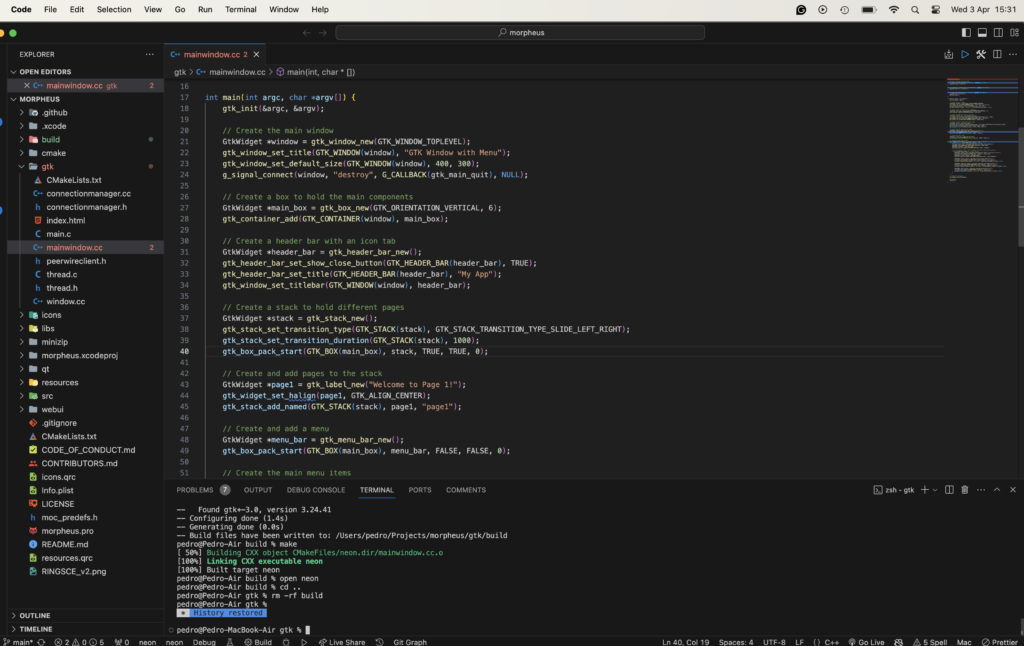
    Today, we are going to learn how to build the ongoing project morpheus F2F, where you will find an API written in C++. Where you are going to be able to see your documents purchased on ringsce shop.

    git clone https://github.com/ringsce/morpheus.git

    Besides being an F2F is an engine to download the assets for Ekron CCG and RPG.

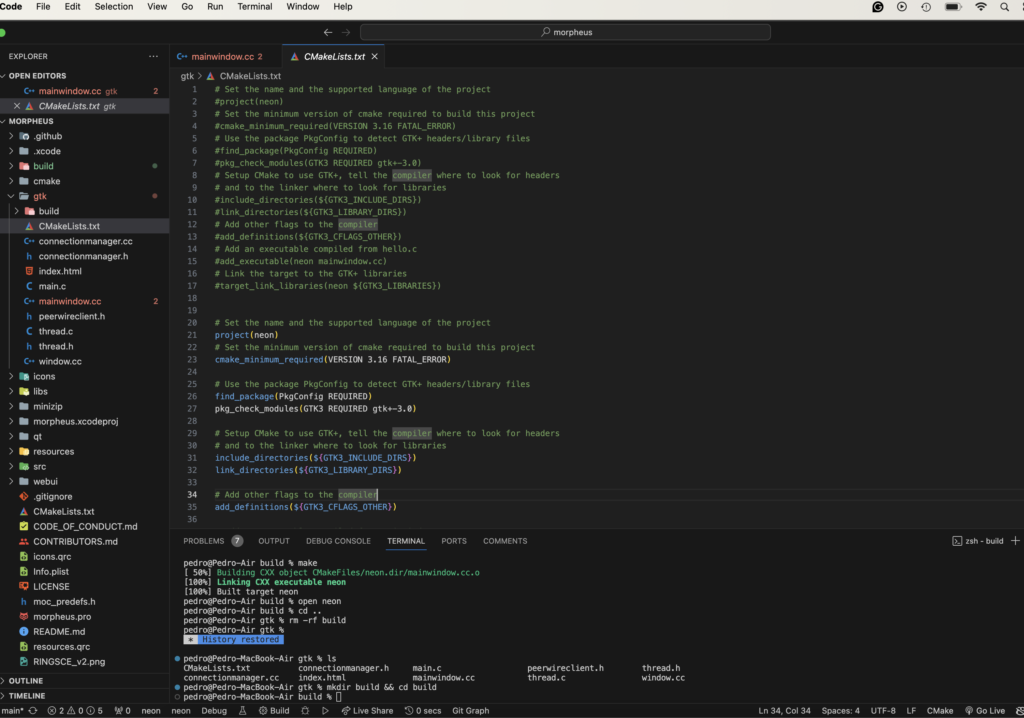
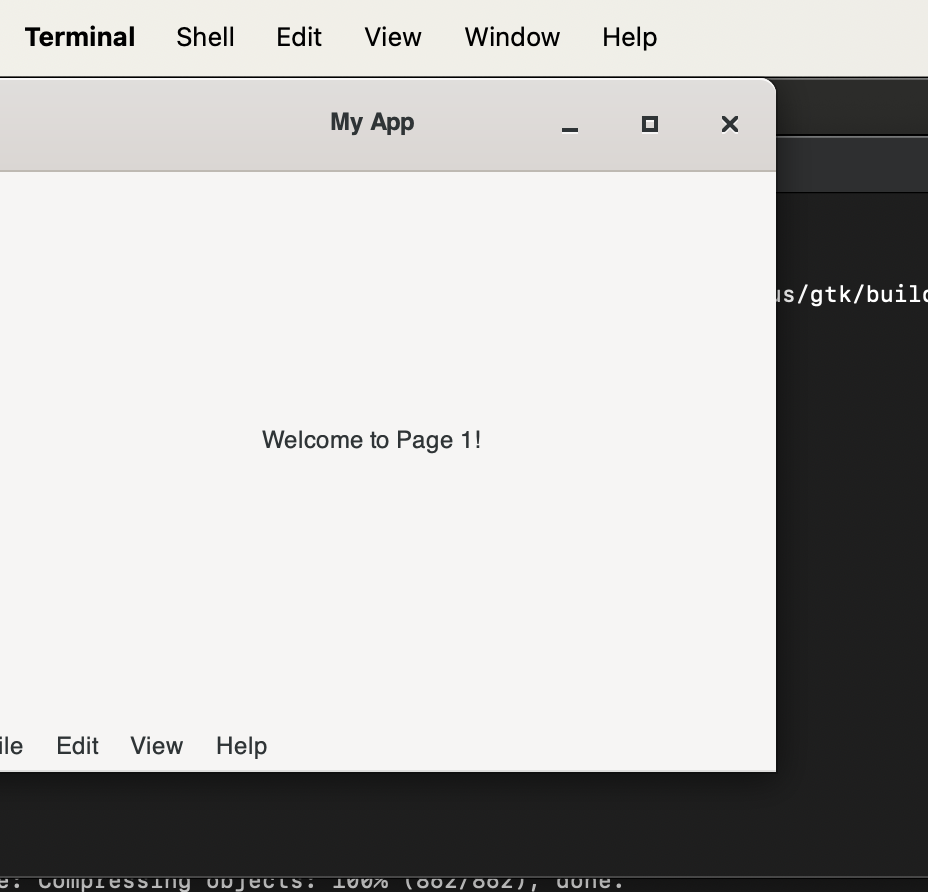
    Open the folder on vs code, it’s there it is being coded. Today, our focus will be the gtk3 UI.

    Now, go to terminal:

    cd gtk && mkdir build && cd build
    cmake ../ && make
    

    Then:

  • ringsCE phosh status #1

    Introduction:

    In the dynamic landscape of technology, the convergence of open-source platforms and mobile computing has ushered in a new era of innovation and collaboration. One such convergence is the utilization of the Samsung A13 as the elected device, alongside the Fedora 38 aarch64 image on the MacBook Air M2, to craft images tailored for the Phosh mobile environment. This symbiotic relationship not only underscores the flexibility of open-source software but also exemplifies the cooperative efforts aimed at enhancing user experiences across diverse platforms.

    Utilizing the Samsung A13 as the elected device alongside the Fedora 38 aarch64 image on the MacBook Air M2 represents a pivotal step in the creation of optimized images for the Phosh mobile environment. Known for its user-centric design and adaptability, Phosh finds a natural fit on devices powered by the Samsung A13 chipset. By harnessing the capabilities of Fedora 38 and the innovative hardware of the MacBook Air M2, developers can seamlessly craft mobile experiences tailored to the Samsung A13 ecosystem.

    Beyond the realm of interface optimization, a broader collaborative initiative is underway to revolutionize the gaming landscape on Samsung A13 devices. Central to this initiative is the development of an open-source gaming platform specifically designed for the Samsung A13 chipset. At its core lies the Samsung A13 gaming ringsce engine, a dynamic framework designed to empower developers and gamers alike.

    The Samsung A13 gaming ringsce engine embodies a fusion of cutting-edge technology and community-driven innovation. By embracing open-source principles, developers have created a platform that not only pushes the boundaries of mobile gaming but also fosters inclusivity and collaboration within the gaming community. Thus, the Samsung A13 gaming ringsce engine serves as a testament to the transformative power of open-source development and collective creativity.

    In summary, the utilization of the Samsung A13 as the elected device alongside the Fedora 38 aarch64 image on the MacBook Air M2 to build images for the Phosh mobile environment signifies a convergence of innovation and collaboration. Moreover, the development of the Samsung A13 gaming ringsce engine underscores a commitment to redefining the gaming experience on mobile platforms. Together, these initiatives represent the forefront of open-source development, driving forward a future where technology is accessible, inclusive, and empowering for all.

    Conclusion:

    In conclusion, the Phosh mobile environment represents a compelling testament to the power of open-source software and collaborative development efforts. With its user-centric design philosophy and adaptability to diverse hardware platforms like the Samsung A13, Phosh exemplifies the potential for creating seamless and intuitive mobile experiences.

    As showcased through the utilization of the Fedora 38 aarch64 image on the MacBook Air M2, alongside the Samsung A13 chipset, Phosh embodies a convergence of innovation and practicality. By harnessing the capabilities of open-source software and leveraging cutting-edge hardware, developers can craft mobile interfaces that prioritize user experience and accessibility.

    Furthermore, Phosh’s integration into projects such as the Samsung A13 gaming ringsce engine demonstrates its versatility beyond traditional mobile interfaces. Through initiatives like these, Phosh serves as a catalyst for redefining not only how users interact with their devices but also how developers collaborate to push the boundaries of mobile computing.

    In essence, Phosh embodies the ethos of open-source development, fostering inclusivity, creativity, and community-driven innovation. As technology continues to evolve, Phosh stands as a beacon of possibility, offering a glimpse into a future where mobile experiences are seamless, personalized, and empowering for all users.

coder by Gleentech
Privacy Overview

This website uses cookies so that we can provide you with the best user experience possible. Cookie information is stored in your browser and performs functions such as recognising you when you return to our website and helping our team to understand which sections of the website you find most interesting and useful.